


In our last tip, you discovered that with an existing report, you’re able to make and save changes to a layout as a result of the Excel template that is associated with it. This means that any modifications you make persist each time the report is run, with the latest data being populated. If you’d […]
- Solutions
All Solutions
- Standalone Reporting Tool
- Sage Intelligence for Accounting
- Sage 300cloud Intelligence
- Sage 50cloud Pastel Intelligence Reporting
- Sage Pastel Payroll Intelligence Reporting
- Sage 100/200 Evolution Intelligence Reporting
- Sage 100 Intelligence Reporting
- Sage 300 Intelligence Reporting
- Sage 500 Intelligence Reporting
- Sage VIP Intelligence Reporting
- Resources
All Solutions
- Standalone Reporting Tool
- Sage Intelligence for Accounting
- Sage 300cloud Intelligence
- Sage 50cloud Pastel Intelligence Reporting
- Sage Pastel Payroll Intelligence Reporting
- Sage 100/200 Evolution Intelligence Reporting
- Sage 100 Intelligence Reporting
- Sage 300 Intelligence Reporting
- Sage 500 Intelligence Reporting
- Sage VIP Intelligence Reporting
Additional Reports
Download our latest Report Utility tool, giving you the ability to access a library of continually updated reports. You don’t need to waste time manually importing new reports, they are automatically imported into the Report Manager module for you to start using.Sage Intelligence Tips & Tricks
Our Sage Intelligence Tips and Tricks will help you make the most of your favorite reporting solution.Excel Tips & Tricks
Our Excel Tips and Tricks will help you improve your business reporting knowledge and skills.
How to quickly rearrange your worksheets in alphabetical order
Are you looking for a shortcut to quickly rearrange your worksheets in alphabetical order? Instead of dragging and manually arranging your worksheets, you can use VB for Microsoft® Excel® to quickly rearrange them into alphabetical order. Excel currently has no built-in function to rearrange your worksheets. Therefore, if you have a workbook with many worksheets, […]
Saving changes to an existing report layout in Sage Intelligence Reporting
Sage Intelligence Reporting allows you to create reports of your own, as well as customize your existing ones, all in the familiar environment of Microsoft® Excel®. This is based on the Excel template that gets attached to each report. Once it’s linked back, after any changes have been made, the formulas will update seamlessly with […]
An easy way to count cells that are not empty in Excel
Let’s say you want to count cells that contain the number of employees in a data range, and would like to ignore any blank cells. The way to go about doing this is to use the COUNTA function. The COUNTA function is a way to count cells containing any type of information, including error values […]
Enable the recipients of your distributed reports to interact with PivotTables like you do
Have you ever distributed reports containing PivotTables and found that your recipients aren’t able to interact with them, only having a snapshot of the data? Wouldn’t it be great if they could have some of the same functionality you do, like the ability to filter, drill down, or add other fields that may be of […]
How to convert dates into the correct format in Excel
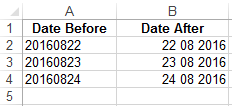
When extracting data from a database, dates don’t always show up in the format you want them to. That’s why it’s helpful to know how to use the Text to Columns option to convert dates into a format that can be used to easily analyze or work with data. As an accountant, you may want […]
How to create quarters in Excel
Currently, there’s no function that will convert dates into quarters in Microsoft® Excel®. However, using the CHOOSE function, we can easily convert dates into quarters in Excel. The CHOOSE function returns a value from a list of items based on a position number. For example, if we had a function =CHOOSE(3,”Apples”,”Bananas”,”Peaches”,”Pineapples”) the function would return […]
Learn how easy it is to create a financial dashboard in Excel!
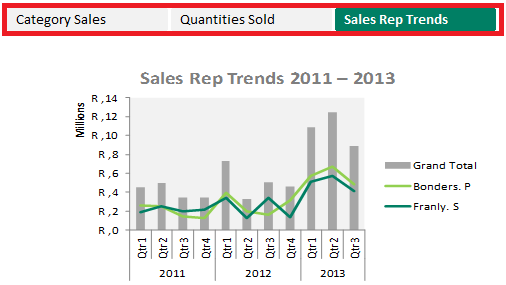
If you’re looking for better insight into your business’s financial performance, then creating an interactive dashboard might be the answer. By using a dashboard, you can quickly and easily recognize trends, do comparisons and review performance indicators that will lead to informed decision making. This week, we’ll take you through a few easy steps to […]
Excel on Steroids 2013 Online has launched!
May 2016 has seen the launch of a new online training course from Sage Intelligence – Excel on Steroids 2013 Online – which aims to help save Excel users time by getting them to a level where they can use Excel like a pro to streamline their business reporting and analysis. The course is the […]
Our top 5 Microsoft Excel tips of 2015
In 2015 we shared a total of 40 Microsoft® Excel® tips with you. We’ve collated the best performing tips, and put together your top 5 tips. These top 5 Excel tips were viewed and revisited the most by our subscribers throughout the year. 1. How to create a waterfall chart in Excel A waterfall chart […]
 © Sage South Africa Pty Ltd 2020
.
All Rights Reserved.
© Sage South Africa Pty Ltd 2020
.
All Rights Reserved.