


My daughter just completed a project of creating a piggy bank at school. This reminded me of the importance of saving. The return on investment is often determined by interest rates and this is why investors or anyone who wants to save chooses the right moment to make an investment. In this week’s tip we […]
- Solutions
All Solutions
- Standalone Reporting Tool
- Sage Intelligence for Accounting
- Sage 300cloud Intelligence
- Sage 50cloud Pastel Intelligence Reporting
- Sage Pastel Payroll Intelligence Reporting
- Sage 100/200 Evolution Intelligence Reporting
- Sage 100 Intelligence Reporting
- Sage 300 Intelligence Reporting
- Sage 500 Intelligence Reporting
- Sage VIP Intelligence Reporting
- Resources
All Solutions
- Standalone Reporting Tool
- Sage Intelligence for Accounting
- Sage 300cloud Intelligence
- Sage 50cloud Pastel Intelligence Reporting
- Sage Pastel Payroll Intelligence Reporting
- Sage 100/200 Evolution Intelligence Reporting
- Sage 100 Intelligence Reporting
- Sage 300 Intelligence Reporting
- Sage 500 Intelligence Reporting
- Sage VIP Intelligence Reporting
Additional Reports
Download our latest Report Utility tool, giving you the ability to access a library of continually updated reports. You don’t need to waste time manually importing new reports, they are automatically imported into the Report Manager module for you to start using.Sage Intelligence Tips & Tricks
Our Sage Intelligence Tips and Tricks will help you make the most of your favorite reporting solution.Excel Tips & Tricks
Our Excel Tips and Tricks will help you improve your business reporting knowledge and skills.
How to quickly create a dynamic drop down list in Excel
A dynamic drop down list in Microsoft® Excel® is a convenient way of selecting data without making changes to the source. Let’s say you have a list where you are likely to add or remove values, a dynamic drop down would be the best option to select data. With a dynamic drop down list, when […]
Need to look up unit prices in Excel? Why not use the LOOKUP function.
In this week’s tip we’ll show you how to look up unit prices in your workbook using the LOOKUP function in Excel. The LOOKUP function is an alternative method to the more commonly used VLOOKUP function in Microsoft® Excel®. Manually entering data in your workbook can lead to inaccuracies with your information, you can apply […]
How to quickly create a date format using a custom formula in Excel
By adding a custom formula to a range of cells, you can create a date, without having to manually format each cell (This also known as suffixing numbers with text strings). Let’s say, you have numbers in a spreadsheet and you wish to display them in a particular date format, you can apply a custom […]
Automatically highlight upcoming and past due dates
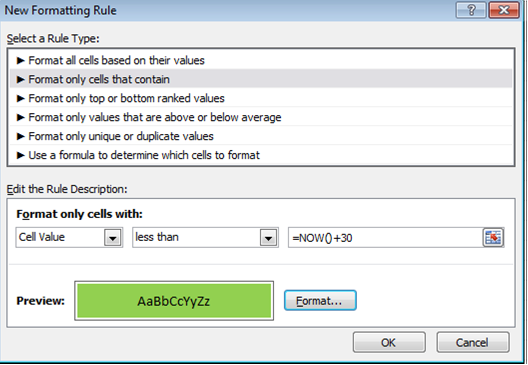
From Excel 2010, there’s a way to automatically highlight upcoming and past due dates. For example, if you have expiry dates for stock in a spreadsheet, it’s possible to highlight the stock that has expired as well as the stock that will expire within 30 days. This is achievable with conditional formatting. Below is a […]
Business Intelligence for SMB’s Part 3: 5 benefits of Business Intelligence for SMBs
Business Intelligence (BI) has become quite the ‘buzzword’ in the software industry in the last few years, yet many small business owners still view it as the realm of big business only. As we move towards 2020 and information overload becomes commonplace, however, SMBs are now starting to realize that BI can benefit them too. […]
A new year’s resolution for SMBs
As small to mid-sized businesses enter 2012, many owners and executives may be considering technology-related strategies to streamline processes, gain competitive advantage and generally make their lives easier in the year ahead. Erik Kaas, Vice President of Product Management for Mid-market ERP products, Sage North America, discusses here why it’s time for companies to get […]
Why Mid-Sized Businesses should invest in an integrated Excel-based Business Intelligence solution: Reason No. 1
Business Intelligence (BI) will give companies a competitive advantage during the next decade and there are many compelling reasons why mid-sized businesses should make it a priority to invest in an integrated Excel-based BI solution sooner rather than later. Below is just one reason why mid-market enterprises need BI. Reason 1: Automate reporting processes All […]
5 reasons why SMMEs should invest in an Alchemex Business Intelligence solution
ALCHEMEX is the leading developer, enabler and support-provider of affordable Excel-based Business Intelligence (BI) software for small to medium enterprises. Alchemex reporting software provides an integrated, automated, and Excel-based BI solution, presenting preformatted drillable Excel reports, executable at the click of a button. As more and more small and medium enterprises recognize the need for […]
Why Small Businesses should invest in an integrated Excel-based Business Intelligence solution: Reason No. 4
All companies face constant pressure to increase profitability, improve cash flow, reduce costs, and reduce risk in order to improve financial performance. The ability to make good decisions and proactively solve issues is crucial to success at every level of an organization, every day. And as smaller companies grow or face stiffer competition, the need […]
 © Sage South Africa Pty Ltd 2020
.
All Rights Reserved.
© Sage South Africa Pty Ltd 2020
.
All Rights Reserved.