A good Business Intelligence solution will give your company a competitive advantage, and there are many compelling reasons why all business owners should make it a priority to invest in one. Here are the top three: Reason 1: Automate reporting processes Most companies face constant pressure to increase profitability, improve cash flow, reduce costs, and […]
- Solutions
All Solutions
- Standalone Reporting Tool
- Sage Intelligence for Accounting
- Sage 300cloud Intelligence
- Sage 50cloud Pastel Intelligence Reporting
- Sage Pastel Payroll Intelligence Reporting
- Sage 100/200 Evolution Intelligence Reporting
- Sage 100 Intelligence Reporting
- Sage 300 Intelligence Reporting
- Sage 500 Intelligence Reporting
- Sage VIP Intelligence Reporting
- Resources
All Solutions
- Standalone Reporting Tool
- Sage Intelligence for Accounting
- Sage 300cloud Intelligence
- Sage 50cloud Pastel Intelligence Reporting
- Sage Pastel Payroll Intelligence Reporting
- Sage 100/200 Evolution Intelligence Reporting
- Sage 100 Intelligence Reporting
- Sage 300 Intelligence Reporting
- Sage 500 Intelligence Reporting
- Sage VIP Intelligence Reporting
Additional Reports
Download our latest Report Utility tool, giving you the ability to access a library of continually updated reports. You don’t need to waste time manually importing new reports, they are automatically imported into the Report Manager module for you to start using.Sage Intelligence Tips & Tricks
Our Sage Intelligence Tips and Tricks will help you make the most of your favorite reporting solution.Excel Tips & Tricks
Our Excel Tips and Tricks will help you improve your business reporting knowledge and skills.- Learning
- Support
All Solutions
- Standalone Reporting Tool
- Sage Intelligence for Accounting
- Sage 300cloud Intelligence
- Sage 50cloud Pastel Intelligence Reporting
- Sage Pastel Payroll Intelligence Reporting
- Sage 100/200 Evolution Intelligence Reporting
- Sage 100 Intelligence Reporting
- Sage 300 Intelligence Reporting
- Sage 500 Intelligence Reporting
- Sage VIP Intelligence Reporting
Additional Reports
Download our latest Report Utility tool, giving you the ability to access a library of continually updated reports. You don’t need to waste time manually importing new reports, they are automatically imported into the Report Manager module for you to start using.Sage Intelligence Tips & Tricks
Our Sage Intelligence Tips and Tricks will help you make the most of your favorite reporting solution.Excel Tips & Tricks
Our Excel Tips and Tricks will help you improve your business reporting knowledge and skills.Get Support Assistance
Can’t find the solution to the challenge you’re facing in the resource library? No problem! Our highly-trained support team are here to help you out.Knowledgebase
Did you know that you also have access to the same knowledgebase articles our colleagues use here at Sage Intelligence? Available 24/7, the Sage Intelligence Knowledgebase gives you access to articles written and updated by Sage support analysts.Report Writers
Having some trouble creating or customizing the exact report you need to suit your business’s requirements? Contact one of the expert report writers recommended by Sage Intelligence.- Sage City
- University
- About Us
- Contact Us
Home Microsoft Excel Page 6
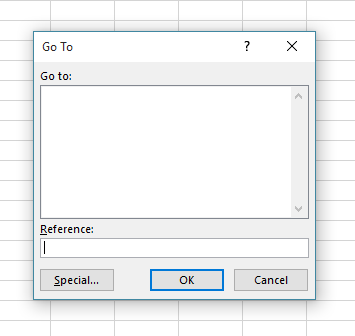
How to delete data but keep your formulas on a worksheet in Excel
Have you ever found that at the beginning of the financial year you need to make a copy of the previous year’s workbook? If so, you’d need to delete all the old year’s data, but you would really like to keep your formulas in the worksheet. By using the Go To dialogue box, there is […]
Microsoft Excel: The good, the bad, and the advantage of added BI capability
Microsoft Excel is the universal language of business and accountants, and most decision-makers in small to mid-sized businesses use the king of spreadsheets in some way for reporting. In fact, research analyst Gartner has conceded that “Excel is still the number one reporting tool”. Why then, would you want or need to use a Business […]
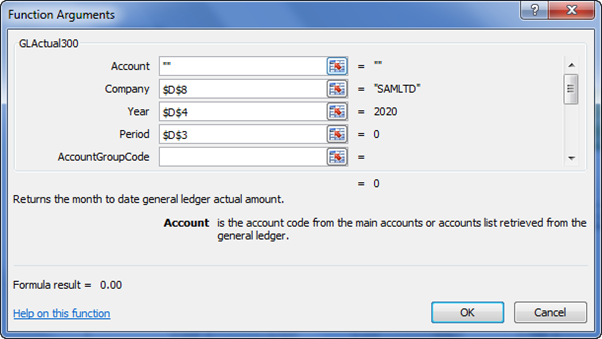
Learn different ways to add and edit Sage Intelligence formulas in the Financial Report Designer
Once you know how to create your own customized reports, using the Sage Intelligence Report Designer and Microsoft® Excel®, you have the power to analyze any aspect of your financials! At the core of this is knowing how to add and edit Sage Intelligence formulas in a report. In this tip, I’ll show you the […]
How to quickly convert negative values to positive values
Sometimes converting negative values to positive values can be time-consuming. This tip allows you to quickly convert a range of negative values into positive values, without having to edit each cell. Applies To: Microsoft® Excel® for Windows 2010, 2013, and 2016. 1. In a blank cell, enter the value -1. 2. Select the cell with […]
Simple and affordable business intelligence is real
The traditional business intelligence (BI) environment has become bogged down with high-ticket prices, delayed deployments, failed integrations and slow responses to BI requests, and frankly, has lacked any real new innovative ideas for a long time. This begs the question—does simple and affordable business intelligence even exist? Shaking things up This poor reputation has preceded […]
How to use the IFS Function in Microsoft® Excel®
The IFS function gives you an efficient alternative to the tedious task of creating a nested IF function. The IFS function checks conditions sequentially, and as soon as a condition is found to be true, the function stops and returns the specified value. You can take advantage of this logic to define a default result […]
3 PivotTable Improvements in Microsoft Excel 2016
The PivotTable is one of the easiest tools used to transform huge amounts of data into meaningful reports. Excel didn’t disappoint with the improvements that have been made to PivotTables in their 2016 version. These include the following; Field List search, Automatic Time Grouping, and Multi-select Slicers. In this tip, we explore some improvements made […]
Exploring Power BI with Sage Intelligence
For over a decade, Sage Intelligence has delivered on-premise solutions on almost every continent. We have amounted 100s and thousands of customers through our innovative reports and software. As can be expected, we have obtained a vast amount of expertise in both financial and operational reporting. For a long time, Excel has been our go-to area […]
How to get a distinct count in a Pivot Table
Do you need to know how many customers you have invoiced this month? When creating a Pivot Table and adding your customers to both the row labels and again in the value area, each transaction is totaled for each customer. This does not give a true reflection of how many customers you have invoiced. In […]
Return to topLearning
Sage South Africa
© Sage South Africa Pty Ltd 2020
.
All Rights Reserved.