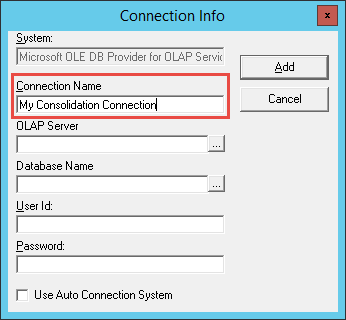
Sage Intelligence allows you to report on data from different companies in a single report to obtain a holistic view of your organization and allow you to carry out more detailed comparative analysis. The primary way to do this is through a Consolidation Report that uses a Consolidation Connection. Once a Consolidation Connection has been […]

- Solutions
All Solutions
- Standalone Reporting Tool
- Sage Intelligence for Accounting
- Sage 300cloud Intelligence
- Sage 50cloud Pastel Intelligence Reporting
- Sage Pastel Payroll Intelligence Reporting
- Sage 100/200 Evolution Intelligence Reporting
- Sage 100 Intelligence Reporting
- Sage 300 Intelligence Reporting
- Sage 500 Intelligence Reporting
- Sage VIP Intelligence Reporting
- Resources
All Solutions
- Standalone Reporting Tool
- Sage Intelligence for Accounting
- Sage 300cloud Intelligence
- Sage 50cloud Pastel Intelligence Reporting
- Sage Pastel Payroll Intelligence Reporting
- Sage 100/200 Evolution Intelligence Reporting
- Sage 100 Intelligence Reporting
- Sage 300 Intelligence Reporting
- Sage 500 Intelligence Reporting
- Sage VIP Intelligence Reporting
Additional Reports
Download our latest Report Utility tool, giving you the ability to access a library of continually updated reports. You don’t need to waste time manually importing new reports, they are automatically imported into the Report Manager module for you to start using.Sage Intelligence Tips & Tricks
Our Sage Intelligence Tips and Tricks will help you make the most of your favorite reporting solution.Excel Tips & Tricks
Our Excel Tips and Tricks will help you improve your business reporting knowledge and skills.- Learning
- Support
All Solutions
- Standalone Reporting Tool
- Sage Intelligence for Accounting
- Sage 300cloud Intelligence
- Sage 50cloud Pastel Intelligence Reporting
- Sage Pastel Payroll Intelligence Reporting
- Sage 100/200 Evolution Intelligence Reporting
- Sage 100 Intelligence Reporting
- Sage 300 Intelligence Reporting
- Sage 500 Intelligence Reporting
- Sage VIP Intelligence Reporting
Additional Reports
Download our latest Report Utility tool, giving you the ability to access a library of continually updated reports. You don’t need to waste time manually importing new reports, they are automatically imported into the Report Manager module for you to start using.Sage Intelligence Tips & Tricks
Our Sage Intelligence Tips and Tricks will help you make the most of your favorite reporting solution.Excel Tips & Tricks
Our Excel Tips and Tricks will help you improve your business reporting knowledge and skills.Get Support Assistance
Can’t find the solution to the challenge you’re facing in the resource library? No problem! Our highly-trained support team are here to help you out.Knowledgebase
Did you know that you also have access to the same knowledgebase articles our colleagues use here at Sage Intelligence? Available 24/7, the Sage Intelligence Knowledgebase gives you access to articles written and updated by Sage support analysts.Report Writers
Having some trouble creating or customizing the exact report you need to suit your business’s requirements? Contact one of the expert report writers recommended by Sage Intelligence.- Sage City
- University
- About Us
- Contact Us
Home Business Intelligence Page 8
Three key characteristics of a high-performance business management solution
With a good business management solution that manages your finances and operations all in one system, you can gain company-wide visibility into your business so you know where you’ve been, where you are currently and where you will end up in terms of cash spent, time and schedule commitments met. In addition, you can keep […]
There’s big value in small business data
I read an interesting article the other day about how a novel targeted at young, single females and housewives wasn’t selling as well as expected. When the publisher looked deeper into its sales data, it found that this market segment made up only a small portion of readers – and that the majority of buyers […]
Discover how to compare two versions of a workbook in Excel
Sometimes when working in Excel, you may want to compare two versions of a workbook to see what was changed. It could be an issue such as totals that are manually entered instead of formula calculated that you want to check. You can use Microsoft Spreadsheet Compare to run a report on the differences, and […]
Learn how to switch output modes when running a report in Sage Intelligence
Did you know that apart from being able to run reports out to Excel, Sage Intelligence allows you to switch output modes which can be useful when designing and debugging reports? Two additional options are provided, output to Screen and output to SQL. Output to Screen does away with rendering a report to Excel and […]
Learn how to change the year a column refers to in the Online Report Designer
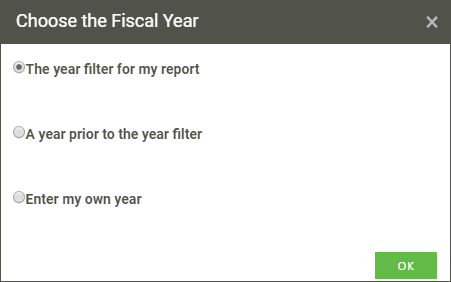
In financial reporting, it is common to refer to years other than the current one, for example; in an Actual vs Prior Income Statement (or Profit and Loss report). Sage Intelligence gives you several options to determine the year that you would like your columns to refer to when designing reports in the Online Report […]
Why it no longer makes sense to keep your people data-starved and in the dark
Charles Teversham, MD of Sage Intelligence, considers the benefits of moving from a feudal model of sharing data to a more democratic one. In 13th century Europe, literacy was largely confined to the clergy and some elites, and few adults among the general population could read or write. But that picture changed as a result […]
Using Microsoft Excel as a Data Source in Sage Intelligence
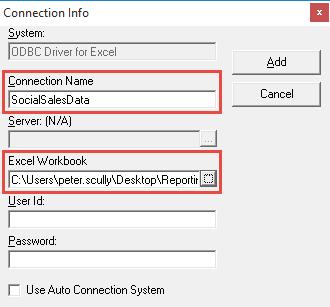
You may be aware that Sage Intelligence allows you to connect to any ODBC compliance data source, meaning that you can access and report on information from just about anywhere in your organisation. Included is the ability to use Microsoft Excel as a data source, which is useful in cases where your business management or […]
Why mobility matters: Learn the three C’s
Mobility has changed the way we work—especially for businesses that depend on personnel not working at a desk or in and office. When asked how “anytime, anywhere” connectivity helps business leaders be more efficient, they typically respond with three answers: convenience, communication, or collaboration. Convenience When operations or field personnel need to call office staff […]
Making use of Wildcards in your Reporting Trees
Reporting Trees is a feature of the Financial Report Designer, and allows you to model organisational hierarchies based on the structure of your business. You can then filter your layouts by the different units in your trees to view your data in ways that make sense to you. Sage Intelligence makes use of wildcards to […]
Return to topLearning
Sage South Africa
© Sage South Africa Pty Ltd 2020
.
All Rights Reserved.