


Attending Sage Summit 2016 in Chicago? Here are some of the Sage Intelligence sessions we recommend: Click here to register for a Sage Summit Session, or click on one of the links below to register for a Sage Intelligence session. Sage Intelligence Reporting Sessions MM-7469 Power up your Excel skills for effective business reporting MM-7475 Customizing […]
- Solutions
All Solutions
- Standalone Reporting Tool
- Sage Intelligence for Accounting
- Sage 300cloud Intelligence
- Sage 50cloud Pastel Intelligence Reporting
- Sage Pastel Payroll Intelligence Reporting
- Sage 100/200 Evolution Intelligence Reporting
- Sage 100 Intelligence Reporting
- Sage 300 Intelligence Reporting
- Sage 500 Intelligence Reporting
- Sage VIP Intelligence Reporting
- Resources
All Solutions
- Standalone Reporting Tool
- Sage Intelligence for Accounting
- Sage 300cloud Intelligence
- Sage 50cloud Pastel Intelligence Reporting
- Sage Pastel Payroll Intelligence Reporting
- Sage 100/200 Evolution Intelligence Reporting
- Sage 100 Intelligence Reporting
- Sage 300 Intelligence Reporting
- Sage 500 Intelligence Reporting
- Sage VIP Intelligence Reporting
Additional Reports
Download our latest Report Utility tool, giving you the ability to access a library of continually updated reports. You don’t need to waste time manually importing new reports, they are automatically imported into the Report Manager module for you to start using.Sage Intelligence Tips & Tricks
Our Sage Intelligence Tips and Tricks will help you make the most of your favorite reporting solution.Excel Tips & Tricks
Our Excel Tips and Tricks will help you improve your business reporting knowledge and skills.
Learn how to restrict who can edit your Sage Intelligence reports
With the latest release of Sage Intelligence Reporting, through the Security Manager you are able to give viewing and editing rights to report users in different roles. This means that you can allow some users to edit reports in the Report Manager while restricting others. You can also give some users the right to only […]
Learn what to do if your BI Tools tab goes missing in Sage Intelligence
In our last tip we showed you what to do if your Task Pane goes missing. You can find it here. This time we’re going to follow the same thread and look at what to do if your BI Tools tab disappears. Step 1 The first thing to do is make sure that in Excel, […]
How to use Sparklines to view trends in Cash Flow data

In this tip, you’ll discover how to use Sparklines to analyze your cash flow data. First introduced in Microsoft® Excel® 2010, Sparklines are small charts that fit into a single cell in a worksheet. We’ll show you how to use them to get a quick look at trends or changes in your data that may […]
Automatically highlight upcoming and past due dates
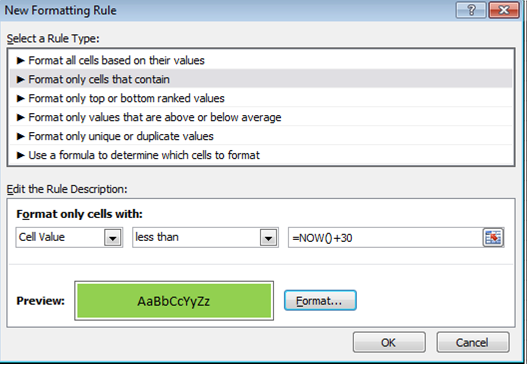
From Excel 2010, there’s a way to automatically highlight upcoming and past due dates. For example, if you have expiry dates for stock in a spreadsheet, it’s possible to highlight the stock that has expired as well as the stock that will expire within 30 days. This is achievable with conditional formatting. Below is a […]
How to Create One Report from Two Independent Systems
I have just come across a post on the Plus Computer blog that discusses the best way of getting data from Sage ERP Accpac and Sage CRM, two independent but synchronized systems, into one report. Read it and see why the author, Alistair Hill, reaches the conclusion that solutions like Sage ERP Accpac Intelligence are designed exactly […]
Santa delivers ERP dashboard
Glen Mund recently requested an ERP Dashboard for Christmas. It was at the top of his wish list, ahead of the “Inception” DVD and a pair of “BOSE” noise reduction headphones. And it was on his list despite the fact that he actually has an ERP dashboard already. You see, his current ERP dashboard is calculated […]
5 reasons why SMMEs should invest in an Alchemex Business Intelligence solution
ALCHEMEX is the leading developer, enabler and support-provider of affordable Excel-based Business Intelligence (BI) software for small to medium enterprises. Alchemex reporting software provides an integrated, automated, and Excel-based BI solution, presenting preformatted drillable Excel reports, executable at the click of a button. As more and more small and medium enterprises recognize the need for […]
Why Small Businesses should invest in an integrated Excel-based Business Intelligence solution: Reason No. 4
All companies face constant pressure to increase profitability, improve cash flow, reduce costs, and reduce risk in order to improve financial performance. The ability to make good decisions and proactively solve issues is crucial to success at every level of an organization, every day. And as smaller companies grow or face stiffer competition, the need […]
Why Small Businesses should invest in an integrated Excel-based Business Intelligence solution: Reason No. 3
It is a must for a small business to have the commercial intelligence to understand and act upon market trends for their products and services. For a big corporate, developing and introducing a product in the market based upon misread market interpretations will not necessarily become a survival problem. But if a small business makes […]
 © Sage South Africa Pty Ltd 2020
.
All Rights Reserved.