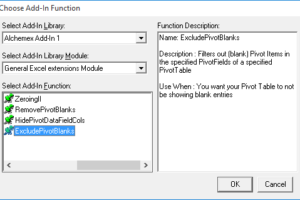
When creating reports, it’s usually preferred that rows with irrelevant data are excluded—as this results in a tidier, more readable report. When it comes to PivotTable reports, this can include rows with blank items. Below is an example of a report with them shown. To get rid of them, we have an add-in specifically for […]

- Solutions
All Solutions
- Standalone Reporting Tool
- Sage Intelligence for Accounting
- Sage 300cloud Intelligence
- Sage 50cloud Pastel Intelligence Reporting
- Sage Pastel Payroll Intelligence Reporting
- Sage 100/200 Evolution Intelligence Reporting
- Sage 100 Intelligence Reporting
- Sage 300 Intelligence Reporting
- Sage 500 Intelligence Reporting
- Sage VIP Intelligence Reporting
- Resources
All Solutions
- Standalone Reporting Tool
- Sage Intelligence for Accounting
- Sage 300cloud Intelligence
- Sage 50cloud Pastel Intelligence Reporting
- Sage Pastel Payroll Intelligence Reporting
- Sage 100/200 Evolution Intelligence Reporting
- Sage 100 Intelligence Reporting
- Sage 300 Intelligence Reporting
- Sage 500 Intelligence Reporting
- Sage VIP Intelligence Reporting
Additional Reports
Download our latest Report Utility tool, giving you the ability to access a library of continually updated reports. You don’t need to waste time manually importing new reports, they are automatically imported into the Report Manager module for you to start using.Sage Intelligence Tips & Tricks
Our Sage Intelligence Tips and Tricks will help you make the most of your favorite reporting solution.Excel Tips & Tricks
Our Excel Tips and Tricks will help you improve your business reporting knowledge and skills.- Learning
- Support
All Solutions
- Standalone Reporting Tool
- Sage Intelligence for Accounting
- Sage 300cloud Intelligence
- Sage 50cloud Pastel Intelligence Reporting
- Sage Pastel Payroll Intelligence Reporting
- Sage 100/200 Evolution Intelligence Reporting
- Sage 100 Intelligence Reporting
- Sage 300 Intelligence Reporting
- Sage 500 Intelligence Reporting
- Sage VIP Intelligence Reporting
Additional Reports
Download our latest Report Utility tool, giving you the ability to access a library of continually updated reports. You don’t need to waste time manually importing new reports, they are automatically imported into the Report Manager module for you to start using.Sage Intelligence Tips & Tricks
Our Sage Intelligence Tips and Tricks will help you make the most of your favorite reporting solution.Excel Tips & Tricks
Our Excel Tips and Tricks will help you improve your business reporting knowledge and skills.Get Support Assistance
Can’t find the solution to the challenge you’re facing in the resource library? No problem! Our highly-trained support team are here to help you out.Knowledgebase
Did you know that you also have access to the same knowledgebase articles our colleagues use here at Sage Intelligence? Available 24/7, the Sage Intelligence Knowledgebase gives you access to articles written and updated by Sage support analysts.Report Writers
Having some trouble creating or customizing the exact report you need to suit your business’s requirements? Contact one of the expert report writers recommended by Sage Intelligence.- Sage City
- University
- About Us
- Contact Us
Is Power BI really worth the hype?
Many years ago, when I was a young Business Intelligence (BI) Report Writer and long before Power BI, I remember seeing Excel 2010 for the first time—mesmerized by the striking animations that shimmer in the splash screen. I remember my excitement to play with it, like a child waiting to tear off the gift-wrap and […]
What’s all the bot-her about?
Bots seemed to be the hot topic of 2016. But why are so many businesses looking to use a bot? Why do they see potential in something that, it in a lot of ways, is a competitor for some of their own customers’ businesses? Well, let’s take a look at Sage’s bot—Hello Pegg. This is […]
An inside look at creating software for small business owners
Have you ever closely examined something that you use every single day? The most useful things in life are quite often those which we take for granted. For example, who ever thought of the design for a pair of scissors? Could you think of a better way for them to work? Why do we sometimes […]
How to enhance your Excel dashboards with Power View reports
Dashboards in Microsoft® Excel® are used for visually presenting important business information. Dashboards can display current status of metrics and key performance indicators. In this tip, we look at how to enhance dashboards with a Power View report by analyzing sales data. Power View reports in Microsoft® Excel® pull your data together in tables, matrices, […]
Rest, Relaxation and Reporting – Why good support matters
This is a real-time account of a financial manager faced with a Sage Intelligence Reporting issue late on a Sunday afternoon. This is why good support matters. It’s 3pm on a Sunday afternoon and I’m trying to get my last bit of relaxation in before starting the work week ahead. The result… I stumble to […]
Midway Two makes the move to automated consolidation
As the holding company for seven subsidiaries, Midway Two’s monthly financial assignment includes the consolidation of its group’s results. In order to monitor the progress of the firm, each month end is a recipe of administrative man-hours, information processing and software tools in a race to output financials. Add a bit of the monthly unexpected, a touch of […]
The Sage Intelligence Reporting resources and learning you need, all in one place
To enable you to get going and make the most of our smart reporting solution, here’s a list of the helpful Sage Intelligence Reporting resources available in our resource library: You can engage with partners and customers right now on the Sage Intelligence Reporting Community. Download the one-page Kick-off guide specific to your accounting/BMS solution […]
The cash flow conundrum: How visual reporting can help
Starting a small business is almost like leaping out of a plane without a backup parachute. It’s exciting, but at the same time, quite risky. There are several reasons why 80% of small businesses in South Africa fail within the first three years, the greatest reason being cash flow. Check out this e-book which attempts […]
More efficient report running: Part 2 – Using system variables with scheduled reports
In this tip, we continue from where we left off with the previous tip, and will demonstrate how you can use system variables when scheduling reports to run automatically. This will reinforce how they are applied during the scheduling process. If you didn’t catch the previous tip, you can find it here. There are many […]
Return to topLearning
Sage South Africa
© Sage South Africa Pty Ltd 2020
.
All Rights Reserved.