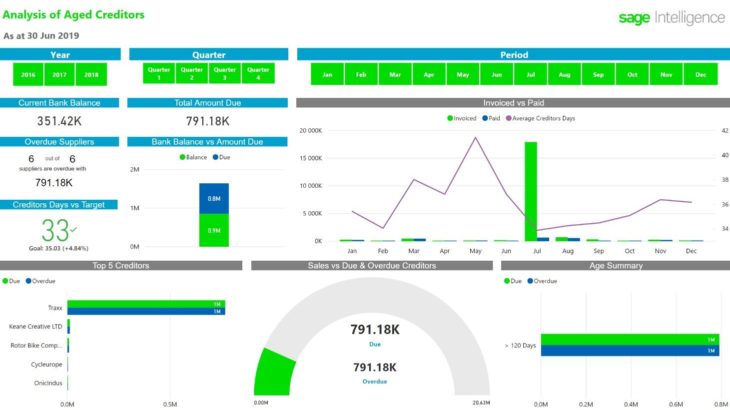
With a disorganized reporting structure, finding anything specific can be like finding a needle in a haystack. Stop wasting time searching for reports by creating an organized folder structure with Sage Intelligence. The most effective folders structures are easy to use, so everyone can intuitively find the reports they’re looking for. Applicable Sage Business Cloud […]
- Solutions
All Solutions
- Standalone Reporting Tool
- Sage Intelligence for Accounting
- Sage 300cloud Intelligence
- Sage 50cloud Pastel Intelligence Reporting
- Sage Pastel Payroll Intelligence Reporting
- Sage 100/200 Evolution Intelligence Reporting
- Sage 100 Intelligence Reporting
- Sage 300 Intelligence Reporting
- Sage 500 Intelligence Reporting
- Sage VIP Intelligence Reporting
- Resources
All Solutions
- Standalone Reporting Tool
- Sage Intelligence for Accounting
- Sage 300cloud Intelligence
- Sage 50cloud Pastel Intelligence Reporting
- Sage Pastel Payroll Intelligence Reporting
- Sage 100/200 Evolution Intelligence Reporting
- Sage 100 Intelligence Reporting
- Sage 300 Intelligence Reporting
- Sage 500 Intelligence Reporting
- Sage VIP Intelligence Reporting
Additional Reports
Download our latest Report Utility tool, giving you the ability to access a library of continually updated reports. You don’t need to waste time manually importing new reports, they are automatically imported into the Report Manager module for you to start using.Sage Intelligence Tips & Tricks
Our Sage Intelligence Tips and Tricks will help you make the most of your favorite reporting solution.Excel Tips & Tricks
Our Excel Tips and Tricks will help you improve your business reporting knowledge and skills.- Learning
- Support
All Solutions
- Standalone Reporting Tool
- Sage Intelligence for Accounting
- Sage 300cloud Intelligence
- Sage 50cloud Pastel Intelligence Reporting
- Sage Pastel Payroll Intelligence Reporting
- Sage 100/200 Evolution Intelligence Reporting
- Sage 100 Intelligence Reporting
- Sage 300 Intelligence Reporting
- Sage 500 Intelligence Reporting
- Sage VIP Intelligence Reporting
Additional Reports
Download our latest Report Utility tool, giving you the ability to access a library of continually updated reports. You don’t need to waste time manually importing new reports, they are automatically imported into the Report Manager module for you to start using.Sage Intelligence Tips & Tricks
Our Sage Intelligence Tips and Tricks will help you make the most of your favorite reporting solution.Excel Tips & Tricks
Our Excel Tips and Tricks will help you improve your business reporting knowledge and skills.Get Support Assistance
Can’t find the solution to the challenge you’re facing in the resource library? No problem! Our highly-trained support team are here to help you out.Knowledgebase
Did you know that you also have access to the same knowledgebase articles our colleagues use here at Sage Intelligence? Available 24/7, the Sage Intelligence Knowledgebase gives you access to articles written and updated by Sage support analysts.Report Writers
Having some trouble creating or customizing the exact report you need to suit your business’s requirements? Contact one of the expert report writers recommended by Sage Intelligence.- Sage City
- University
- About Us
- Contact Us
Home accounting Page 6
Additional Sage Intelligence reports to boost your business
How would you like constant access to a library of additional reports? The Sage Intelligence Report Utility allows you to select the reports you like and automatically imports them into your Report Manager. All you need to do is download and install the Report Utility, select the reports you want, and click the Download button. […]
The business mindfulness series: Part 2 – Growing Pains
In the first part of this series, I compared becoming a new parent to nurturing relationships with new customers (and also managing their payments). The intent was for entrepreneurs to take 5 minutes every now and then to reflect on one element of their businesses to help them grow. In this article, I will focus on […]
Understanding date formats in Sage Intelligence
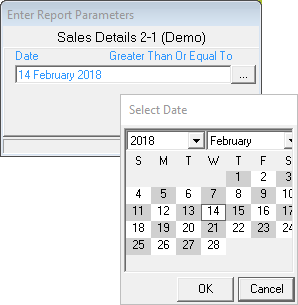
If you’re a user of the Sage Intelligence Connector Module, you’ll know that the Connector maintains the links between your Sage Intelligence reports and your Sage Business Management Solution data sources. Different database systems store and recognise dates in different formats, and Sage Intelligence attempts to hide this detail from you by translating dates at […]
3 Easy steps to help you complete a cash flow template
In order to correctly show the movement and management of cash within a business, accountants use a cash flow statement. This statement will display a business’s money coming in from ‘cash receipts’ and where it has paid money out, ‘cash paid’. The cash flow statement is a standard financial statement and is frequently used in […]
5 real-life reasons why business intelligence is this accountants’ best friend
As an accountant, my most valuable commodity is time. Being responsible for daily capturing, month end procedures and group reporting, I often don’t have time to breathe! Fortunately, a lot of my responsibilities are hastened because I use business intelligence (BI), which helps me extract key information from large volumes of data directly from our […]
Learn how to add additional fields to a report
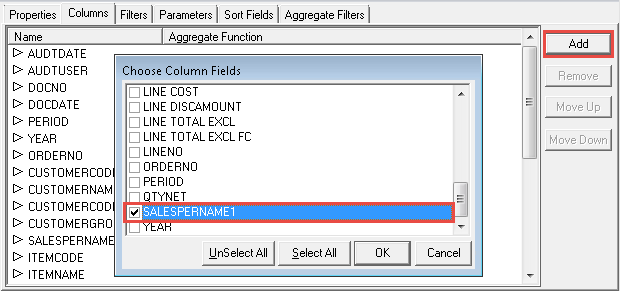
Did you know that whether you are using a standard or a customised Sage Intelligence report, you’re free to add additional fields to it in the Sage Intelligence Report Manager? There are a couple of reasons why you might want to do this. For example, perhaps the report doesn’t have a particular field you want […]
Why you should INVEST in user stories
As a Business Analyst in a company utilizing an Agile development methodology with a high release-to-market approach, it has become truly evident and apparent that user stories are powerful tools in the software delivery process. Conjuring on average about 3 to 5 user stories on a good day, the practice of creating, communicating and processing […]
Using conditional formatting with custom Excel formulas
Conditional formatting is an effective Microsoft Excel feature that allows you to highlight important information, for example; the ability to find duplicate values within your spreadsheet. You can create your own rule by applying conditional formatting to individual cells or a range of cells. When you have selected the data you want to format, you […]
How to calculate Sales Tax/ VAT using PowerPivot Measures in Excel
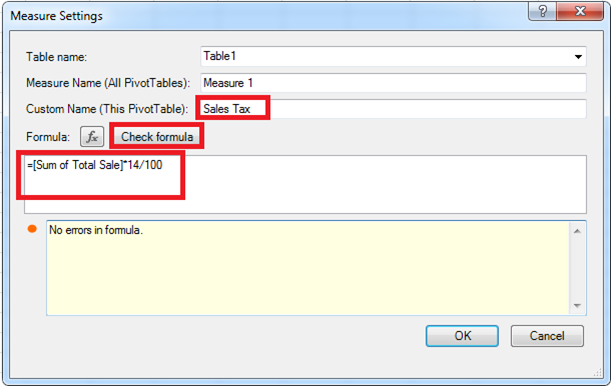
In a previous tip, we showed you how to set up a PivotTable using PowerPivot. You’re now going to learn how you can easily calculate Sales Tax/ VAT using the Measures feature in the PowerPivot tab. If you’re the business’s accountant, you may want to analyze the Sales Tax/ VAT that will be paid on the products […]
Return to topLearning
Sage South Africa
© Sage South Africa Pty Ltd 2020
.
All Rights Reserved.