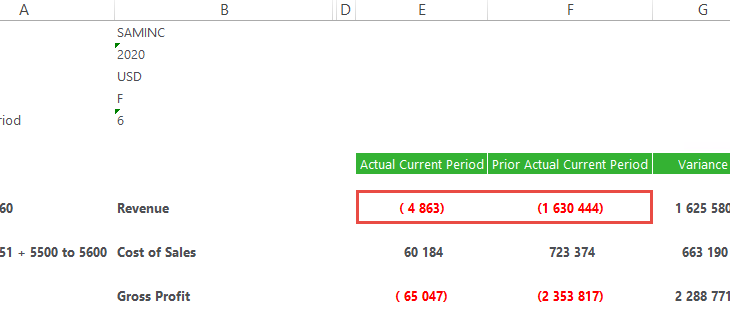
Sage Intelligence Reporting Cloud provides convenience to you as it lets you work in whichever environment you’re most comfortable in. You can either choose to design reports in your browser through the Online Report Designer or in Excel—through the Excel Report Designer. When making use of the Excel Report Designer, there are a number of […]

- Solutions
All Solutions
- Standalone Reporting Tool
- Sage Intelligence for Accounting
- Sage 300cloud Intelligence
- Sage 50cloud Pastel Intelligence Reporting
- Sage Pastel Payroll Intelligence Reporting
- Sage 100/200 Evolution Intelligence Reporting
- Sage 100 Intelligence Reporting
- Sage 300 Intelligence Reporting
- Sage 500 Intelligence Reporting
- Sage VIP Intelligence Reporting
- Resources
All Solutions
- Standalone Reporting Tool
- Sage Intelligence for Accounting
- Sage 300cloud Intelligence
- Sage 50cloud Pastel Intelligence Reporting
- Sage Pastel Payroll Intelligence Reporting
- Sage 100/200 Evolution Intelligence Reporting
- Sage 100 Intelligence Reporting
- Sage 300 Intelligence Reporting
- Sage 500 Intelligence Reporting
- Sage VIP Intelligence Reporting
Additional Reports
Download our latest Report Utility tool, giving you the ability to access a library of continually updated reports. You don’t need to waste time manually importing new reports, they are automatically imported into the Report Manager module for you to start using.Sage Intelligence Tips & Tricks
Our Sage Intelligence Tips and Tricks will help you make the most of your favorite reporting solution.Excel Tips & Tricks
Our Excel Tips and Tricks will help you improve your business reporting knowledge and skills.- Learning
- Support
All Solutions
- Standalone Reporting Tool
- Sage Intelligence for Accounting
- Sage 300cloud Intelligence
- Sage 50cloud Pastel Intelligence Reporting
- Sage Pastel Payroll Intelligence Reporting
- Sage 100/200 Evolution Intelligence Reporting
- Sage 100 Intelligence Reporting
- Sage 300 Intelligence Reporting
- Sage 500 Intelligence Reporting
- Sage VIP Intelligence Reporting
Additional Reports
Download our latest Report Utility tool, giving you the ability to access a library of continually updated reports. You don’t need to waste time manually importing new reports, they are automatically imported into the Report Manager module for you to start using.Sage Intelligence Tips & Tricks
Our Sage Intelligence Tips and Tricks will help you make the most of your favorite reporting solution.Excel Tips & Tricks
Our Excel Tips and Tricks will help you improve your business reporting knowledge and skills.Get Support Assistance
Can’t find the solution to the challenge you’re facing in the resource library? No problem! Our highly-trained support team are here to help you out.Knowledgebase
Did you know that you also have access to the same knowledgebase articles our colleagues use here at Sage Intelligence? Available 24/7, the Sage Intelligence Knowledgebase gives you access to articles written and updated by Sage support analysts.Report Writers
Having some trouble creating or customizing the exact report you need to suit your business’s requirements? Contact one of the expert report writers recommended by Sage Intelligence.- Sage City
- University
- About Us
- Contact Us
48 Years Young – Pictures that paint 1000 words
My parents are remarkable. They have just celebrated their 48-year wedding anniversary, and during this time period, they raised 5 children. They have lived in seven countries and worked in numerous others. Probably most remarkable was that as part of their honeymoon in 1969, they drove a red MGB from Cape Town to rural Zambia […]
Avoiding the Ref# error: How to convert formulas to values in Excel
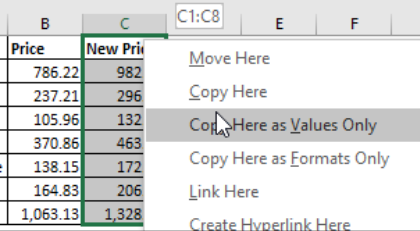
Sometimes when working with spreadsheets in Excel, you may want to distribute a workbook with static values. If your worksheet has formulas that are linked to other worksheets, you may end up with the dreaded Ref# error when distributing. That is why it is important to convert the formulas to values. In this tip, we […]
How business intelligence gets rid of the daily grind
Do you optimally use the invaluable business information your company collects on a daily basis? If you answer YES to one or more of the following questions, it may be about time you discover how business intelligence helps get rid of the daily grind. 1. Do you spend hours pulling together management and financial reports by manually […]
View specific aspects of several different worksheets on one worksheet
One worksheet can be used to view specific aspects of several different worksheets. This can be done using the Linked Picture option. There are a few options when consolidating information from multiple worksheets, and in this tip, we’ll deal with the most popular. The option for this tip enables you to paste the copied cells […]
How to reverse the sign of an account in your Sage Intelligence Financial Report Designer
In the Sage Intelligence Financial Report Designer, account balances are returned in their “natural format” from your Sage accounting or business management solution. Therefore, credit accounts (with a credit balance) are shown as negative values and debit accounts (with a debit balance) are shown as positives values. However, in financial reporting, there are times when […]
How to avoid the VALUE error when using the SUMIF function between workbooks
When using the SUMIF function between workbooks, you may get a VALUE error if the source workbook is not open. This behavior occurs when the formula that contains the SUMIF, COUNTIF, or COUNTBLANK function refers to cells in a closed workbook. To work around this, use a combination of the SUM and IF functions together […]
Microsoft Excel: The good, the bad, and the advantage of added BI capability
Microsoft Excel is the universal language of business and accountants, and most decision-makers in small to mid-sized businesses use the king of spreadsheets in some way for reporting. In fact, research analyst Gartner has conceded that “Excel is still the number one reporting tool”. Why then, would you want or need to use a Business […]
How to quickly convert negative values to positive values
Sometimes converting negative values to positive values can be time-consuming. This tip allows you to quickly convert a range of negative values into positive values, without having to edit each cell. Applies To: Microsoft® Excel® for Windows 2010, 2013, and 2016. 1. In a blank cell, enter the value -1. 2. Select the cell with […]
Simple and affordable business intelligence is real
The traditional business intelligence (BI) environment has become bogged down with high-ticket prices, delayed deployments, failed integrations and slow responses to BI requests, and frankly, has lacked any real new innovative ideas for a long time. This begs the question—does simple and affordable business intelligence even exist? Shaking things up This poor reputation has preceded […]
Return to topLearning
Sage South Africa
© Sage South Africa Pty Ltd 2020
.
All Rights Reserved.