In a climate of economic volatility, changing consumers, and globalized competition, small to medium-sized enterprises (SMEs) perhaps need access to accurate, actionable business insight into data even more than bigger enterprises do. Most SMEs are operating on tight margins and don’t have endless reservoirs of cash and credit. They need up-to-the-minute information about trends in […]
- Solutions
All Solutions
- Standalone Reporting Tool
- Sage Intelligence for Accounting
- Sage 300cloud Intelligence
- Sage 50cloud Pastel Intelligence Reporting
- Sage Pastel Payroll Intelligence Reporting
- Sage 100/200 Evolution Intelligence Reporting
- Sage 100 Intelligence Reporting
- Sage 300 Intelligence Reporting
- Sage 500 Intelligence Reporting
- Sage VIP Intelligence Reporting
- Resources
All Solutions
- Standalone Reporting Tool
- Sage Intelligence for Accounting
- Sage 300cloud Intelligence
- Sage 50cloud Pastel Intelligence Reporting
- Sage Pastel Payroll Intelligence Reporting
- Sage 100/200 Evolution Intelligence Reporting
- Sage 100 Intelligence Reporting
- Sage 300 Intelligence Reporting
- Sage 500 Intelligence Reporting
- Sage VIP Intelligence Reporting
Additional Reports
Download our latest Report Utility tool, giving you the ability to access a library of continually updated reports. You don’t need to waste time manually importing new reports, they are automatically imported into the Report Manager module for you to start using.Sage Intelligence Tips & Tricks
Our Sage Intelligence Tips and Tricks will help you make the most of your favorite reporting solution.Excel Tips & Tricks
Our Excel Tips and Tricks will help you improve your business reporting knowledge and skills.- Learning
- Support
All Solutions
- Standalone Reporting Tool
- Sage Intelligence for Accounting
- Sage 300cloud Intelligence
- Sage 50cloud Pastel Intelligence Reporting
- Sage Pastel Payroll Intelligence Reporting
- Sage 100/200 Evolution Intelligence Reporting
- Sage 100 Intelligence Reporting
- Sage 300 Intelligence Reporting
- Sage 500 Intelligence Reporting
- Sage VIP Intelligence Reporting
Additional Reports
Download our latest Report Utility tool, giving you the ability to access a library of continually updated reports. You don’t need to waste time manually importing new reports, they are automatically imported into the Report Manager module for you to start using.Sage Intelligence Tips & Tricks
Our Sage Intelligence Tips and Tricks will help you make the most of your favorite reporting solution.Excel Tips & Tricks
Our Excel Tips and Tricks will help you improve your business reporting knowledge and skills.Get Support Assistance
Can’t find the solution to the challenge you’re facing in the resource library? No problem! Our highly-trained support team are here to help you out.Knowledgebase
Did you know that you also have access to the same knowledgebase articles our colleagues use here at Sage Intelligence? Available 24/7, the Sage Intelligence Knowledgebase gives you access to articles written and updated by Sage support analysts.Report Writers
Having some trouble creating or customizing the exact report you need to suit your business’s requirements? Contact one of the expert report writers recommended by Sage Intelligence.- Sage City
- University
- About Us
- Contact Us
Five non-negotiable questions you should be asking your reporting solution
Many companies today suffer from a lack of visibility into key performance metrics. We call this “keyhole visibility” because it’s the equivalent of trying to evaluate what’s happening in a room by looking through the keyhole. With a narrow view, you’re unable to fully understand what’s behind the door and what might be lurking around […]
Learn how to save a report to file using Sage Intelligence
Apart from just running out a report, Sage Intelligence allows you to automatically save the generated workbook to a file during run-time. This is useful, for example, if you run a monthly sales report that needs to be saved to a central location for others to view. In this tip, I’m going to show you […]
Dashboards: All your vital information in one place
A dashboard is a business tool that displays a set of metrics, KPIs and other relevant information to a business user. Dashboards are here to stay because of their simplicity and self-service capabilities. And recently, Microsoft has made dashboards even more relevant, visual and efficient to use through Power BI. Haven’t heard of it? Here’s […]
Financial statements: Three useful indicators and what they say about your business
Well-prepared financial statements contain an incredible amount of timely and revealing information about your business’ financial position. What are its strengths? Where are the vulnerabilities and challenges? Is the business making money? Savvy executives use the information on financial statements—most notably the balance sheet, income statement, and statement of cash flows—to drive decisions and chart […]
The importance of financial reporting
According to research, 35% of organizations indicate that demand for expedited financial information delivery is their top pressure. Financial analytics and financial reporting, are valuable sources for informed decision-making across an organization, and should be part of your company’s analytics strategy. By leveraging a financial analysis and reporting solution integrated with your business management solution, […]
Sage Intelligence helps Microsoft introduce user-defined functions for Excel at the Ignite Conference!
“When are you introducing user-defined functions for Excel?” This was the big question we had for Microsoft back in the middle of this year (2017). Specifically for us, this meant user-defined functions that were defined in Javascript, and made available through our web-based Excel add-in for the cloud version of Sage Intelligence. We’d asked this […]
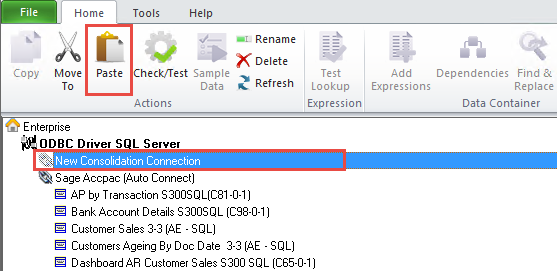
Three ways to use a Consolidation Connection in Sage Intelligence
In our last tip, I showed you how to create a Consolidation Connection in the Connector module, which lets you combine data from different companies into a single report to obtain a holistic view of your organization. If you would like to review the tip, you can find it here. Once one is created, there […]
Six software features that add value to your analytics capabilities
Assuming your business already uses an integrated software system, you will also need reporting or business intelligence tools that can extract, clean, and transform the data into a format that’s meaningful for users. New tools and technologies are emerging to make information come alive, including data visualization, process simulation, and predictive techniques. By taking advantage […]
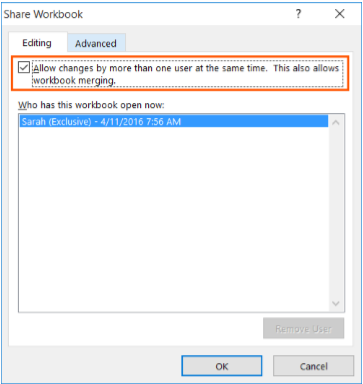
Collaborating on a Shared Workbook
Multiple users can effectively work on a spreadsheet by sharing it, and then collaborating on it. Edits can be made simultaneously by team members, thus having a continuously updated version of the spreadsheet available all the time. In this way, version control is enforced, and duplicate work is eliminated. Applies To: Microsoft® Excel® for Windows […]
Return to topLearning
Sage South Africa
© Sage South Africa Pty Ltd 2020
.
All Rights Reserved.