• Sage City
  • University
  • About Us
  • Contact Us
Sage
  •  Menu
     Close
Home
  • Solutions
    • All Solutions

      All Solutions

      • Standalone Reporting Tool
      • Sage Intelligence for Accounting
      • Sage 300cloud Intelligence
      • Sage 50cloud Pastel Intelligence Reporting
      • Sage Pastel Payroll Intelligence Reporting
      • Sage 100/200 Evolution Intelligence Reporting
      • Sage 100 Intelligence Reporting
      • Sage 300 Intelligence Reporting
      • Sage 500 Intelligence Reporting
      • Sage VIP Intelligence Reporting
    • Resources
      • Additional Reports
      • Sage Intelligence Tips & Tricks
      • Excel Tips & Tricks

        All Solutions

        • Standalone Reporting Tool
        • Sage Intelligence for Accounting
        • Sage 300cloud Intelligence
        • Sage 50cloud Pastel Intelligence Reporting
        • Sage Pastel Payroll Intelligence Reporting
        • Sage 100/200 Evolution Intelligence Reporting
        • Sage 100 Intelligence Reporting
        • Sage 300 Intelligence Reporting
        • Sage 500 Intelligence Reporting
        • Sage VIP Intelligence Reporting

        Additional Reports

        Download our latest Report Utility tool, giving you the ability to access a library of continually updated reports. You don’t need to waste time manually importing new reports, they are automatically imported into the Report Manager module for you to start using.

        Sage Intelligence Tips & Tricks

        Our Sage Intelligence Tips and Tricks will help you make the most of your favorite reporting solution.

        Excel Tips & Tricks

        Our Excel Tips and Tricks will help you improve your business reporting knowledge and skills.
      • Learning
      • Support
        • Get Support Assistance
        • Knowledgebase
        • Report Writers

          All Solutions

          • Standalone Reporting Tool
          • Sage Intelligence for Accounting
          • Sage 300cloud Intelligence
          • Sage 50cloud Pastel Intelligence Reporting
          • Sage Pastel Payroll Intelligence Reporting
          • Sage 100/200 Evolution Intelligence Reporting
          • Sage 100 Intelligence Reporting
          • Sage 300 Intelligence Reporting
          • Sage 500 Intelligence Reporting
          • Sage VIP Intelligence Reporting

          Additional Reports

          Download our latest Report Utility tool, giving you the ability to access a library of continually updated reports. You don’t need to waste time manually importing new reports, they are automatically imported into the Report Manager module for you to start using.

          Sage Intelligence Tips & Tricks

          Our Sage Intelligence Tips and Tricks will help you make the most of your favorite reporting solution.

          Excel Tips & Tricks

          Our Excel Tips and Tricks will help you improve your business reporting knowledge and skills.

          Get Support Assistance

          Can’t find the solution to the challenge you’re facing in the resource library? No problem! Our highly-trained support team are here to help you out.

          Knowledgebase

          Did you know that you also have access to the same knowledgebase articles our colleagues use here at Sage Intelligence? Available 24/7, the Sage Intelligence Knowledgebase gives you access to articles written and updated by Sage support analysts.

          Report Writers

          Having some trouble creating or customizing the exact report you need to suit your business’s requirements? Contact one of the expert report writers recommended by Sage Intelligence.
        • Sage City
        • University
        • About Us
        • Contact Us

        Home automated reporting processes Page 3

        Know your numbers with the Business Snapshot Dashboard

        May 10, 2018 Mathew Love Leave a comment Blog, Business Intelligence

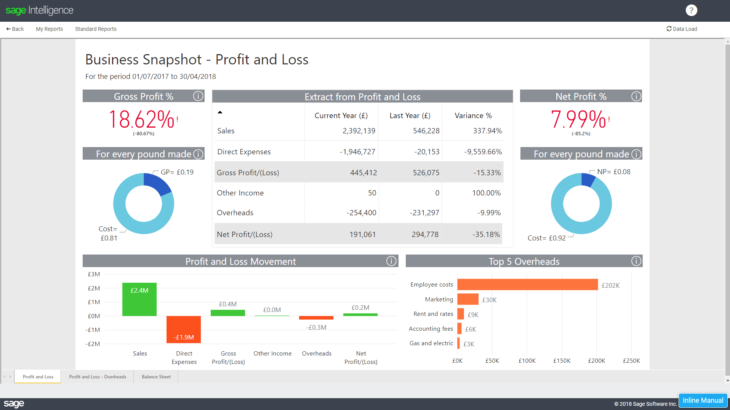
        The Business Snapshot Dashboard – Profit and Loss statement provides a visual summary of how your business is doing with regards to generating sales, managing expenses and creating profits. In other words, whether your business has made or lost money in the period under review. This can also help determine trends for future business decisions. […]
        Continue reading


        Collect your cash with the Analysis of Aged Debtors report

        May 10, 2018 Mathew Love Leave a comment Blog, Business Intelligence

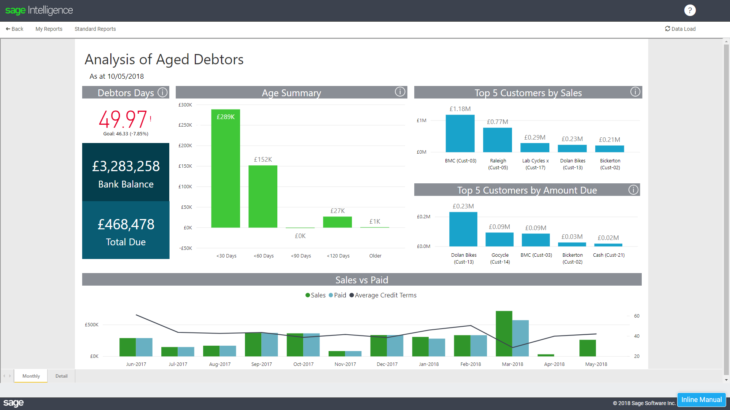
        It’s important for any business owner to know exactly who owes them cash, how much, and when they can expect to receive it from their overdue customers. This is what the Analysis of Aged Debtors report provides. Looking at this Dashboard, the first thing you’ll see is that your Debtors Days are 46.99 and, in the […]

        Continue reading


        Get a picture of your business’s health with the Financial Hygiene Dashboard

        May 10, 2018 Mathew Love Leave a comment Blog, Business Intelligence

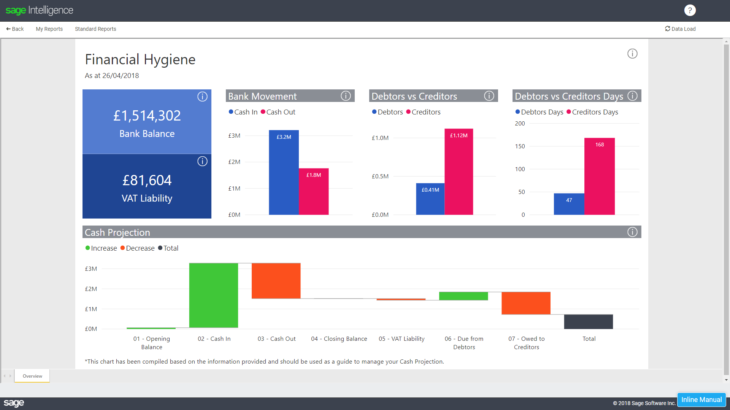
        We all know that cash flow is such an essential ingredient to the survival and success of any business. If you ever encounter cash flow problems at some stage of your business’s life, it could be a serious obstacle to your progress. Which is why it always pays to keep a close eye on what […]

        Continue reading


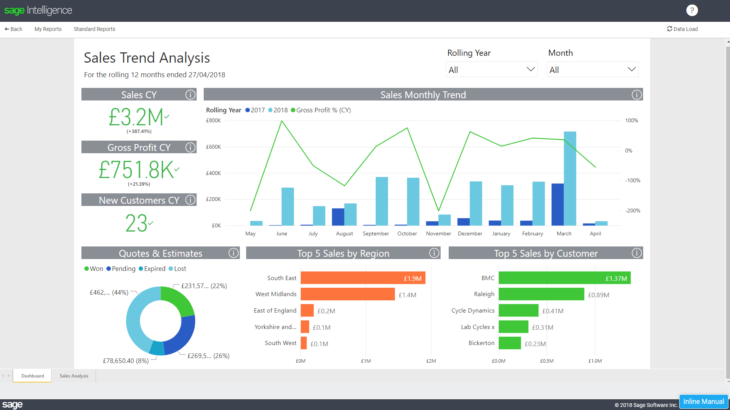
        Understand your customers with a Sales Trend Analysis report

        May 10, 2018 Mathew Love Leave a comment Blog, Business Intelligence

        Most successful businesses use a Sales Trend Analysis to report on and predict sales performance. As a small business, knowledge of this information is power! Being able to view and track Sales Trends year-on-year, as well as sales per sales representative, means that you’re kept up to date and empowered to use this information to […]

        Continue reading


        Using the VLOOKUP formula with the approximate match in Excel

        May 10, 2018 Excel Tips 1 Comment Blog, Business Intelligence, Excel Tips & Tricks

        Have you ever used the VLOOKUP formula with the approximate match in Excel? By using this formula, you’re able to extract the correct trade discount percentage based on the quantity of a specific item purchased. In this tip, we demonstrate how to set this up. If TRUE or 1 is specified in the Range_lookup argument text […]

        Continue reading


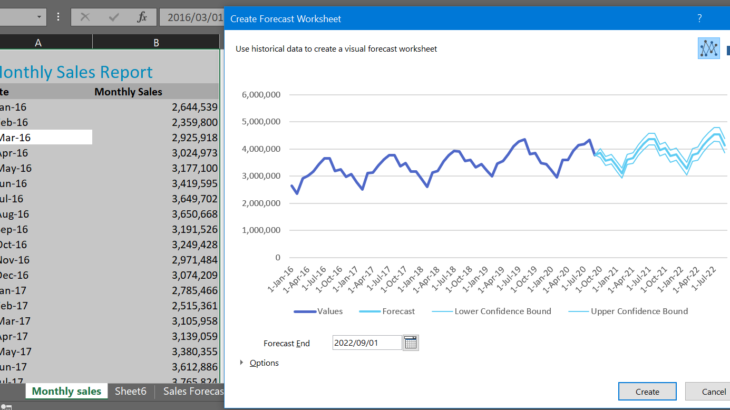
        How to create more accurate forecasts with Excel

        May 9, 2018 Ruth Gray Leave a comment Blog, Excel Tips & Tricks, Tips & Tricks

        Do you need to future-proof your business? The Excel Forecast sheet may be the right tool for you! The Forecast sheet allows you to take your historical business data (sales, cash flow, etc.) and create more accurate forecasts for the future. You are welcome to download the workbook to practice! 1. To create a Forecast […]

        Continue reading


        Inserting 3D models into an Excel spreadsheet

        May 2, 2018 Nigel Naicker Leave a comment Blog, Excel Tips & Tricks, Tips & Tricks

        This is a tip that you’re going to really enjoy if you love imagery and visualisations in your spreadsheet! It’s not the most useful tip in the world, but for most people, especially the creative types—it will put a smile on your face because it’s so much fun to play with. In this tip, I’m […]

        Continue reading


        What’s the big SO WHAT of business intelligence?

        May 2, 2018 Mathew Love Leave a comment Blog, Business Intelligence

        More and more companies are calling for the necessity of business intelligence (BI) and reporting. It’s fast becoming the it word in business, and regularly features in the discussions of many business circles. However, there seems to be a gap in understanding why we need BI. What’s the point of having BI? What’s the big […]

        Continue reading


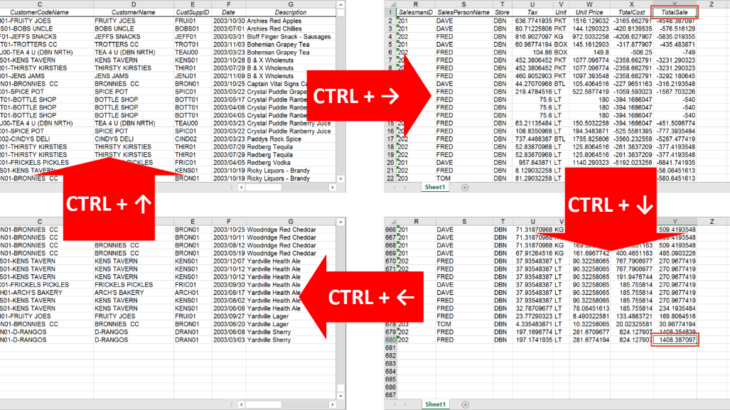
        Learn how to navigate through your data quickly with keyboard shortcuts in Excel

        Apr 25, 2018 Peter Scully Leave a comment Blog, Excel Tips & Tricks, Tips & Tricks

        When working with large data lists in Excel, you may need to know the extent of the data, i.e. the number of rows and columns.  If consistency of the data is important too, then you may need to identify whether there’s any empty rows, columns or cells. An obvious way to check this is by […]

        Continue reading


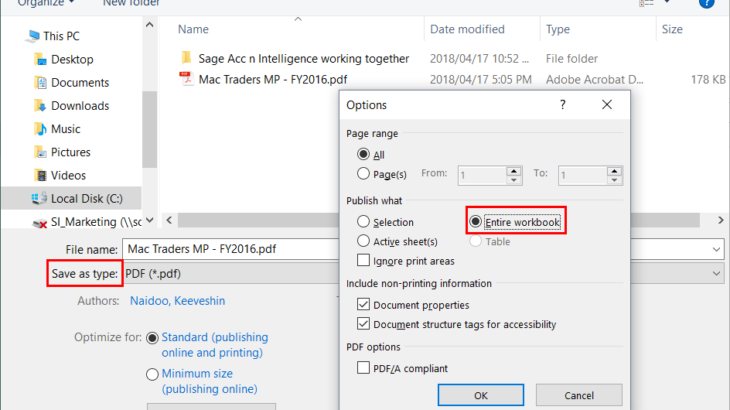
        Learn how to quickly save your Excel management pack as a PDF

        Apr 24, 2018 Nic Hanafey Leave a comment Blog, Sage Intelligence Tips & Tricks, Tips & Tricks

        Do you have an Excel management pack with multiple worksheets and would like to save it as a PDF for convenient viewing and sharing? In this tip, I’m going to show you how easy this is to do. You have three options for this, but before continuing, there are a few things to take note […]

        Continue reading


        Posts navigation

        Older posts
        Newer posts
        Search for:
        Return to top

        Solutions

        • All Solutions

        Resources

        • Additional Reports
        • Sage Intelligence Tips & Tricks
        • Excel Tips & Tricks

        Learning

        Support

        • Get Support Assistance
        • Knowledgebase
        • Report Writers
        Sage Sage South Africa
        Sage South Africa
        • Sitemap
        • Phishing Email Advice
        • Privacy and Cookies
        • Terms and Conditions
        Sage © Sage South Africa Pty Ltd 2020 . All Rights Reserved.

        Loading Comments...