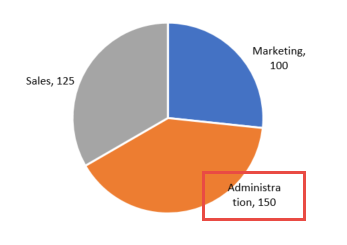
When creating a pie chart and adding data labels to the slices, the wording can sometimes split into two lines—giving you wrapped data labels that aren’t visually appealing. In the below example, Administration has been split into two words, each on a separate line. The labels are wrapped and the results appear incorrectly. Applies To: […]
- Solutions
All Solutions
- Standalone Reporting Tool
- Sage Intelligence for Accounting
- Sage 300cloud Intelligence
- Sage 50cloud Pastel Intelligence Reporting
- Sage Pastel Payroll Intelligence Reporting
- Sage 100/200 Evolution Intelligence Reporting
- Sage 100 Intelligence Reporting
- Sage 300 Intelligence Reporting
- Sage 500 Intelligence Reporting
- Sage VIP Intelligence Reporting
- Resources
All Solutions
- Standalone Reporting Tool
- Sage Intelligence for Accounting
- Sage 300cloud Intelligence
- Sage 50cloud Pastel Intelligence Reporting
- Sage Pastel Payroll Intelligence Reporting
- Sage 100/200 Evolution Intelligence Reporting
- Sage 100 Intelligence Reporting
- Sage 300 Intelligence Reporting
- Sage 500 Intelligence Reporting
- Sage VIP Intelligence Reporting
Additional Reports
Download our latest Report Utility tool, giving you the ability to access a library of continually updated reports. You don’t need to waste time manually importing new reports, they are automatically imported into the Report Manager module for you to start using.Sage Intelligence Tips & Tricks
Our Sage Intelligence Tips and Tricks will help you make the most of your favorite reporting solution.Excel Tips & Tricks
Our Excel Tips and Tricks will help you improve your business reporting knowledge and skills.- Learning
- Support
All Solutions
- Standalone Reporting Tool
- Sage Intelligence for Accounting
- Sage 300cloud Intelligence
- Sage 50cloud Pastel Intelligence Reporting
- Sage Pastel Payroll Intelligence Reporting
- Sage 100/200 Evolution Intelligence Reporting
- Sage 100 Intelligence Reporting
- Sage 300 Intelligence Reporting
- Sage 500 Intelligence Reporting
- Sage VIP Intelligence Reporting
Additional Reports
Download our latest Report Utility tool, giving you the ability to access a library of continually updated reports. You don’t need to waste time manually importing new reports, they are automatically imported into the Report Manager module for you to start using.Sage Intelligence Tips & Tricks
Our Sage Intelligence Tips and Tricks will help you make the most of your favorite reporting solution.Excel Tips & Tricks
Our Excel Tips and Tricks will help you improve your business reporting knowledge and skills.Get Support Assistance
Can’t find the solution to the challenge you’re facing in the resource library? No problem! Our highly-trained support team are here to help you out.Knowledgebase
Did you know that you also have access to the same knowledgebase articles our colleagues use here at Sage Intelligence? Available 24/7, the Sage Intelligence Knowledgebase gives you access to articles written and updated by Sage support analysts.Report Writers
Having some trouble creating or customizing the exact report you need to suit your business’s requirements? Contact one of the expert report writers recommended by Sage Intelligence.- Sage City
- University
- About Us
- Contact Us
Home analyze information Page 5
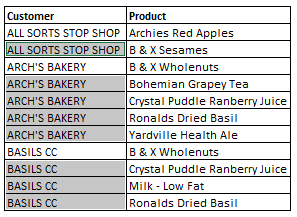
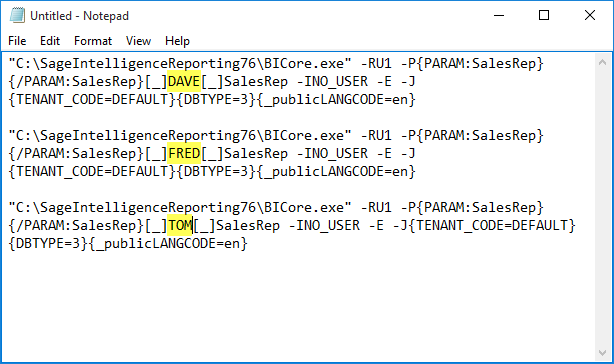
Run multiple versions of the same report, with different parameters, all at once
There may be times when you want to run out the same report but with different parameters. For example, you may have a financial report that you want to run individually for three separate fiscal years. Typically, you would need to run out the report three times, once for each year. Did you know that […]
The big deal with Power BI
Over the past couple of months, the Microsoft Power BI team has been hard at work making all kinds of changes. Some good and some seemingly bad. For this 3rd blog post, I will do my best to chat about what I love and not really love about Power BI—and of course, brag about Sage […]
How to restore missing labels in Excel
Manipulating data with missing labels can pose a challenge. Copying and pasting data can be time consuming and tiresome. That is why, in this tip, we show you how to quickly restore data labels using a simple formula. If you find value in this tip, why not sign up for our Excel Tips and Tricks mailer, […]
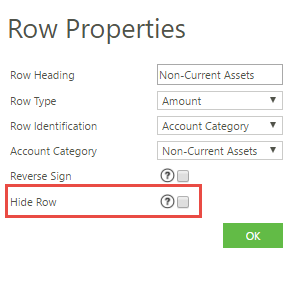
Hide a row or column when designing or editing reports in the Online Report Designer.
Creating a report can be a masterful art, and creating a report that is perfectly tailored to your audience can be an ever-evolving process – especially as the audience evolves. To ensure your report is concise and to the point, it is important to only show the items relevant to your viewers, and not any […]
How to use keyboard shortcuts in Microsoft Excel to increase productivity
Using keyboard shortcuts in Microsoft Excel helps you increase your efficiency and productivity, and helps you to use Microsoft Excel like a pro. In this Tip, we take a look at how we can use Excel shortcuts to save us time and increase our business efficiency. We will learn how to use keyboard shortcuts to […]
How to get a distinct count in a Pivot Table
Do you need to know how many customers you have invoiced this month? When creating a Pivot Table and adding your customers to both the row labels and again in the value area, each transaction is totaled for each customer. This does not give a true reflection of how many customers you have invoiced. In […]
Blast from the past: Age old pearls of wisdom that’ll boost your management potential
A friend and colleague approached me to ask that I write a blog entry on management, and how I manage my team; the techniques and tricks that I employ that help me get the job done. Initially, I was quite apprehensive as to how to go about analyzing what I do and then formulating catchy, […]
Learn how to report on more than just your financials in the Financial Report Designer
The Sage Intelligence Financial Report Designer report provides a comprehensive tool for your financial reporting needs. However, there may be times when you’d like to include other data in it to add to the information you can report on in a single report. Although the Report Designer has a defined structure which must be maintained, […]
Business Intelligence for SMB’s Part 3: 5 benefits of Business Intelligence for SMBs
Business Intelligence (BI) has become quite the ‘buzzword’ in the software industry in the last few years, yet many small business owners still view it as the realm of big business only. As we move towards 2020 and information overload becomes commonplace, however, SMBs are now starting to realize that BI can benefit them too. […]
Return to topLearning
Sage South Africa
© Sage South Africa Pty Ltd 2020
.
All Rights Reserved.