


There are many different charts in Microsoft® Excel®, but only one that allows you to highlight different types of information by combining two or more chart types into one. The combination chart can be used to see how far away a value is from the target or if it is over the target. In this […]
- Solutions
All Solutions
- Standalone Reporting Tool
- Sage Intelligence for Accounting
- Sage 300cloud Intelligence
- Sage 50cloud Pastel Intelligence Reporting
- Sage Pastel Payroll Intelligence Reporting
- Sage 100/200 Evolution Intelligence Reporting
- Sage 100 Intelligence Reporting
- Sage 300 Intelligence Reporting
- Sage 500 Intelligence Reporting
- Sage VIP Intelligence Reporting
- Resources
All Solutions
- Standalone Reporting Tool
- Sage Intelligence for Accounting
- Sage 300cloud Intelligence
- Sage 50cloud Pastel Intelligence Reporting
- Sage Pastel Payroll Intelligence Reporting
- Sage 100/200 Evolution Intelligence Reporting
- Sage 100 Intelligence Reporting
- Sage 300 Intelligence Reporting
- Sage 500 Intelligence Reporting
- Sage VIP Intelligence Reporting
Additional Reports
Download our latest Report Utility tool, giving you the ability to access a library of continually updated reports. You don’t need to waste time manually importing new reports, they are automatically imported into the Report Manager module for you to start using.Sage Intelligence Tips & Tricks
Our Sage Intelligence Tips and Tricks will help you make the most of your favorite reporting solution.Excel Tips & Tricks
Our Excel Tips and Tricks will help you improve your business reporting knowledge and skills.Tips & Tricks
Learn how easy it is to reduce the size of an Excel workbook using a single array formula
We often find ourselves working with Microsoft® Excel® workbooks that contain large amounts of data, causing them to process instructions slowly. To reduce the size of an Excel workbook, consider replacing several formulas with a single array formula. Array formulas can perform multiple calculations and ensure consistency which can lead to better accuracy in your […]
4 Easy steps using the Advanced Filter to extract unique values in Excel
Have you ever found yourself in a situation where you have thousands of duplicate values in a column? Perhaps you were importing client data into Microsoft® Excel® from an accounting system or simply combining data in Excel, but often end up having duplicates values in a given column. If you frequently experience this problem when […]
2 Easy steps using the TRANSPOSE function in Excel to re-arrange data
Have you ever needed to change the orientation of a range of cells whilst maintaining links to the source data and end up having to manually recreate the spreadsheet? Here’s a quick and easy way using the Microsoft® Excel® TRANSPOSE function. The TRANSPOSE function returns a vertical range of cells as a horizontal range, or […]
4 Easy steps to auditing complex formulas in Excel
When creating formulas in Microsoft® Excel®, the expected result is not always returned, and if a complex formula is being used, it can be time consuming to find where the error is occurring. Luckily there is an easy way to audit complex formulas in Excel. In this tip we explain how you can quickly and easily […]
Learn how easy it is to create a financial dashboard in Excel!
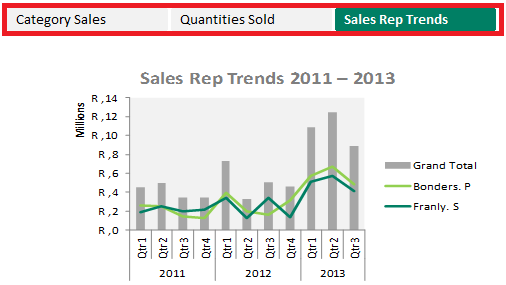
If you’re looking for better insight into your business’s financial performance, then creating an interactive dashboard might be the answer. By using a dashboard, you can quickly and easily recognize trends, do comparisons and review performance indicators that will lead to informed decision making. This week, we’ll take you through a few easy steps to […]
Learn a better way to visualize your data using the Bing Map app in Excel
The Bing Map app is a flashy Microsoft® Excel® Add-In app that makes it easy to plot locations and visualize your data in Excel. The Bing Map would be best to use with data where you have to display values for regions or countries. In today’s exercise, we will use the example of a multinational […]
Easy steps to opening an Excel workbook on a specific worksheet
Assuming you have one frequently used Microsoft® Excel® worksheet in a big workbook, wouldn’t you prefer to land on that specific worksheet when opening the workbook? By creating the simple macro given below, one can land on a specific Excel worksheet and even a specific cell when opening a workbook. Follow these easy steps below as we explain […]
Learn how to quickly remove hyperlinks from an Excel worksheet
Are you looking for an easy and effective method of removing hyperlinks from your worksheet? Sometimes when you copy data from the internet or other sources, you often run the risk of bringing across embedded hyperlinks. Manually removing all the hyperlinks from your worksheets can be a tedious and time consuming exercise. In this week’s tip, […]
Protect parts of your Excel worksheet to prevent unwanted changes
Are there parts of your Microsoft® Excel® worksheet that you wish you could protect? For instance you want to protect certain cells that contain certain formulas and important data, then Worksheet Protection is the answer. Worksheet Protection prevents someone from accidentally or deliberately changing, moving, or deleting important data from a worksheet or workbook. You […]
 © Sage South Africa Pty Ltd 2020
.
All Rights Reserved.
© Sage South Africa Pty Ltd 2020
.
All Rights Reserved.