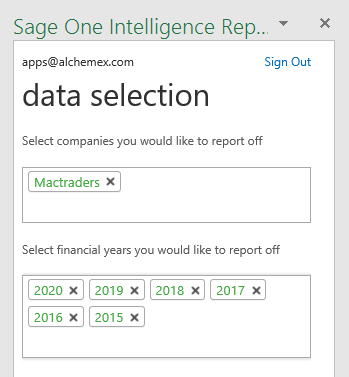
Do you want to create your own operational report and analyze it according to your specific reporting needs from Accounting International? Sage Intelligence Reporting & Microsoft Excel make this easy and quick to do. Applies to: Accounting International, Microsoft Excel 2013 & 2016 How do I do this? 1. Download one of the standard Intelligence […]
- Solutions
All Solutions
- Standalone Reporting Tool
- Sage Intelligence for Accounting
- Sage 300cloud Intelligence
- Sage 50cloud Pastel Intelligence Reporting
- Sage Pastel Payroll Intelligence Reporting
- Sage 100/200 Evolution Intelligence Reporting
- Sage 100 Intelligence Reporting
- Sage 300 Intelligence Reporting
- Sage 500 Intelligence Reporting
- Sage VIP Intelligence Reporting
- Resources
All Solutions
- Standalone Reporting Tool
- Sage Intelligence for Accounting
- Sage 300cloud Intelligence
- Sage 50cloud Pastel Intelligence Reporting
- Sage Pastel Payroll Intelligence Reporting
- Sage 100/200 Evolution Intelligence Reporting
- Sage 100 Intelligence Reporting
- Sage 300 Intelligence Reporting
- Sage 500 Intelligence Reporting
- Sage VIP Intelligence Reporting
Additional Reports
Download our latest Report Utility tool, giving you the ability to access a library of continually updated reports. You don’t need to waste time manually importing new reports, they are automatically imported into the Report Manager module for you to start using.Sage Intelligence Tips & Tricks
Our Sage Intelligence Tips and Tricks will help you make the most of your favorite reporting solution.Excel Tips & Tricks
Our Excel Tips and Tricks will help you improve your business reporting knowledge and skills.- Learning
- Support
All Solutions
- Standalone Reporting Tool
- Sage Intelligence for Accounting
- Sage 300cloud Intelligence
- Sage 50cloud Pastel Intelligence Reporting
- Sage Pastel Payroll Intelligence Reporting
- Sage 100/200 Evolution Intelligence Reporting
- Sage 100 Intelligence Reporting
- Sage 300 Intelligence Reporting
- Sage 500 Intelligence Reporting
- Sage VIP Intelligence Reporting
Additional Reports
Download our latest Report Utility tool, giving you the ability to access a library of continually updated reports. You don’t need to waste time manually importing new reports, they are automatically imported into the Report Manager module for you to start using.Sage Intelligence Tips & Tricks
Our Sage Intelligence Tips and Tricks will help you make the most of your favorite reporting solution.Excel Tips & Tricks
Our Excel Tips and Tricks will help you improve your business reporting knowledge and skills.Get Support Assistance
Can’t find the solution to the challenge you’re facing in the resource library? No problem! Our highly-trained support team are here to help you out.Knowledgebase
Did you know that you also have access to the same knowledgebase articles our colleagues use here at Sage Intelligence? Available 24/7, the Sage Intelligence Knowledgebase gives you access to articles written and updated by Sage support analysts.Report Writers
Having some trouble creating or customizing the exact report you need to suit your business’s requirements? Contact one of the expert report writers recommended by Sage Intelligence.- Sage City
- University
- About Us
- Contact Us
Home Sage Intelligence tips Page 4
Learn how to consolidate different kinds of data into one report
Do you want to consolidate, bring together and analyze different kinds of data in one report? You may want to view your financial, payroll and payments information in a single dashboard. Currently, you may be spending a large amount of time reviewing these different reports to be able to draw a final conclusion. In Sage […]
Creating a reference sheet in your Sage Intelligence reports
Accountants, bookkeepers and financial analysts alike will tell you one of the most sought after capabilities of a well-tuned accounting package is time efficiency. No one wants to spend unnecessary time having to enter monotonous data. This is where a well-specified reference sheet in your Sage Intelligence reports can be of immense help. Take the […]
The Sage Intelligence Learning Portal is here! Here’s how to use it…
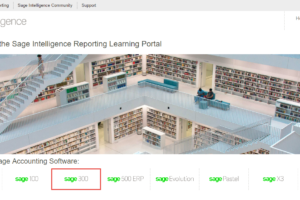
At Sage Intelligence, we recently released our brand new Learning Portal. It consolidates all of our learning resources into one, easy-to-use online library and is categorized to meet your level of knowledge and guide you to mastering your product. In this tip, I’m going to show you how to access the Sage Intelligence Learning Portal […]
Performing a health check of your business using Financial Ratio reports
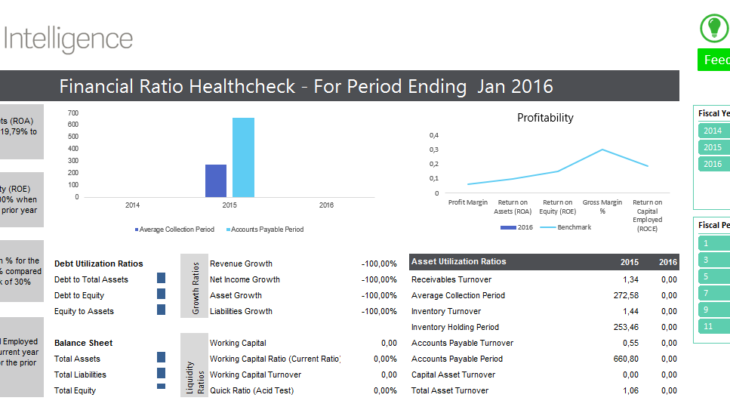
At Sage Intelligence, we believe in providing you with the right information to help you improve the running of your business, and give you back your time. One of the ways we do this is through the free Financial Ratio reports that you can access through our Report Utility. Over the past few weeks, we’ve […]
Saving changes to an existing report layout in Sage Intelligence Reporting
Sage Intelligence Reporting allows you to create reports of your own, as well as customize your existing ones, all in the familiar environment of Microsoft® Excel®. This is based on the Excel template that gets attached to each report. Once it’s linked back, after any changes have been made, the formulas will update seamlessly with […]
Get your filters to stick in PivotTable reports
Have you ever tried to make use of filters in your PivotTable reports, only to find that they don’t stick when you save your template back to the report in the Report Manager? When your workbook is generated, maybe you’d prefer blank items to be hidden, or you would like it to default to the […]
Get a handle on your Sales Flash Report and the AVERAGEIF Function
Would you like to keep track of your most important sales indicators in no time at all? If so, why not check out the free Sales Flash Report provided through the Sage Intelligence Report Utility. This report gives you a quick view of your Sales over a particular day or period and includes measures like […]
3 Easy ways to distribute your Sage Intelligence reports with or without embedded formulas
In Sage Intelligence Reporting you have the ability to distribute reports using 3 different methods. 1. You can send a report via email 2. You can send a report to a FTP location 3. You can publish your file to a drive In older versions of Sage Intelligence Reporting, only static values were sent when […]
Now you can use Microsoft Power View to enhance your Sage Intelligence reports
Did you know that you can use Microsoft Power View with your Sage Intelligence reports? By applying the visual and interactive capabilities of Power View to your Sage Intelligence data, you can create attractive reports that encourage better usability of your data, as well as more enhanced data exploration and visualisation, which gives you the […]
Return to topLearning
Sage South Africa
© Sage South Africa Pty Ltd 2020
.
All Rights Reserved.