Many companies today suffer from a lack of visibility into key performance metrics. We call this “keyhole visibility” because it’s the equivalent of trying to evaluate what’s happening in a room by looking through the keyhole. With a narrow view, you’re unable to fully understand what’s behind the door and what might be lurking around […]
- Solutions
All Solutions
- Standalone Reporting Tool
- Sage Intelligence for Accounting
- Sage 300cloud Intelligence
- Sage 50cloud Pastel Intelligence Reporting
- Sage Pastel Payroll Intelligence Reporting
- Sage 100/200 Evolution Intelligence Reporting
- Sage 100 Intelligence Reporting
- Sage 300 Intelligence Reporting
- Sage 500 Intelligence Reporting
- Sage VIP Intelligence Reporting
- Resources
All Solutions
- Standalone Reporting Tool
- Sage Intelligence for Accounting
- Sage 300cloud Intelligence
- Sage 50cloud Pastel Intelligence Reporting
- Sage Pastel Payroll Intelligence Reporting
- Sage 100/200 Evolution Intelligence Reporting
- Sage 100 Intelligence Reporting
- Sage 300 Intelligence Reporting
- Sage 500 Intelligence Reporting
- Sage VIP Intelligence Reporting
Additional Reports
Download our latest Report Utility tool, giving you the ability to access a library of continually updated reports. You don’t need to waste time manually importing new reports, they are automatically imported into the Report Manager module for you to start using.Sage Intelligence Tips & Tricks
Our Sage Intelligence Tips and Tricks will help you make the most of your favorite reporting solution.Excel Tips & Tricks
Our Excel Tips and Tricks will help you improve your business reporting knowledge and skills.- Learning
- Support
All Solutions
- Standalone Reporting Tool
- Sage Intelligence for Accounting
- Sage 300cloud Intelligence
- Sage 50cloud Pastel Intelligence Reporting
- Sage Pastel Payroll Intelligence Reporting
- Sage 100/200 Evolution Intelligence Reporting
- Sage 100 Intelligence Reporting
- Sage 300 Intelligence Reporting
- Sage 500 Intelligence Reporting
- Sage VIP Intelligence Reporting
Additional Reports
Download our latest Report Utility tool, giving you the ability to access a library of continually updated reports. You don’t need to waste time manually importing new reports, they are automatically imported into the Report Manager module for you to start using.Sage Intelligence Tips & Tricks
Our Sage Intelligence Tips and Tricks will help you make the most of your favorite reporting solution.Excel Tips & Tricks
Our Excel Tips and Tricks will help you improve your business reporting knowledge and skills.Get Support Assistance
Can’t find the solution to the challenge you’re facing in the resource library? No problem! Our highly-trained support team are here to help you out.Knowledgebase
Did you know that you also have access to the same knowledgebase articles our colleagues use here at Sage Intelligence? Available 24/7, the Sage Intelligence Knowledgebase gives you access to articles written and updated by Sage support analysts.Report Writers
Having some trouble creating or customizing the exact report you need to suit your business’s requirements? Contact one of the expert report writers recommended by Sage Intelligence.- Sage City
- University
- About Us
- Contact Us
Home business reporting Page 5
Learn how to save a report to file using Sage Intelligence
Apart from just running out a report, Sage Intelligence allows you to automatically save the generated workbook to a file during run-time. This is useful, for example, if you run a monthly sales report that needs to be saved to a central location for others to view. In this tip, I’m going to show you […]
Dashboards: All your vital information in one place
A dashboard is a business tool that displays a set of metrics, KPIs and other relevant information to a business user. Dashboards are here to stay because of their simplicity and self-service capabilities. And recently, Microsoft has made dashboards even more relevant, visual and efficient to use through Power BI. Haven’t heard of it? Here’s […]
The importance of financial reporting
According to research, 35% of organizations indicate that demand for expedited financial information delivery is their top pressure. Financial analytics and financial reporting, are valuable sources for informed decision-making across an organization, and should be part of your company’s analytics strategy. By leveraging a financial analysis and reporting solution integrated with your business management solution, […]
Sage Intelligence helps Microsoft introduce user-defined functions for Excel at the Ignite Conference!
“When are you introducing user-defined functions for Excel?” This was the big question we had for Microsoft back in the middle of this year (2017). Specifically for us, this meant user-defined functions that were defined in Javascript, and made available through our web-based Excel add-in for the cloud version of Sage Intelligence. We’d asked this […]
Two ways to create calculated columns and rows in your Sage Intelligence reports
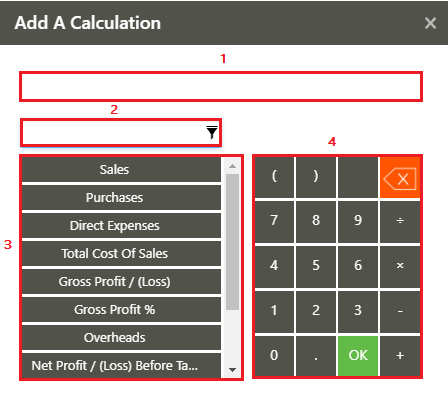
To create insightful and highly customizable reports, Sage Intelligence provides you with the ability to add calculated columns and rows to your reports. These can be used to calculate, for example, variances, totals and other indicators at account and account category level, or based on your columns. The below provides and explanation of the different […]
Three ways to use a Consolidation Connection in Sage Intelligence
In our last tip, I showed you how to create a Consolidation Connection in the Connector module, which lets you combine data from different companies into a single report to obtain a holistic view of your organization. If you would like to review the tip, you can find it here. Once one is created, there […]
Six software features that add value to your analytics capabilities
Assuming your business already uses an integrated software system, you will also need reporting or business intelligence tools that can extract, clean, and transform the data into a format that’s meaningful for users. New tools and technologies are emerging to make information come alive, including data visualization, process simulation, and predictive techniques. By taking advantage […]
How to view or compare two or more worksheets at the same time in Excel
You can quickly view or compare two or more worksheets in the same workbook, or in different workbooks, by viewing them side by side. You can also arrange multiple worksheets to view them all at the same time. In this tip, I show you how. Applies To: Microsoft® Excel® for Windows 2010, 2013, and 2016. […]
Learn how to create a Consolidation Connection
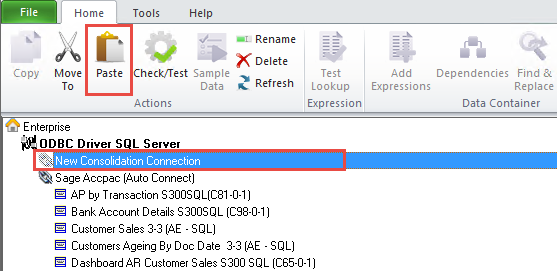
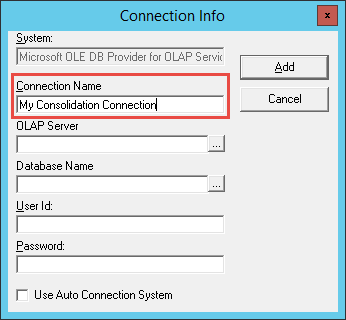
Sage Intelligence allows you to report on data from different companies in a single report to obtain a holistic view of your organization and allow you to carry out more detailed comparative analysis. The primary way to do this is through a Consolidation Report that uses a Consolidation Connection. Once a Consolidation Connection has been […]
Return to topLearning
Sage South Africa
© Sage South Africa Pty Ltd 2020
.
All Rights Reserved.