


If you’ve experienced the mishap of mistakenly closing a file while working on it, or losing it due to a power failure or gremlin in your computer, you’ll know how frustrating it can be. Fortunately, changes were made in Microsoft® Excel® 2010 and 2013 which make the process to recover an unsaved workbook much simpler. […]
- Solutions
All Solutions
- Standalone Reporting Tool
- Sage Intelligence for Accounting
- Sage 300cloud Intelligence
- Sage 50cloud Pastel Intelligence Reporting
- Sage Pastel Payroll Intelligence Reporting
- Sage 100/200 Evolution Intelligence Reporting
- Sage 100 Intelligence Reporting
- Sage 300 Intelligence Reporting
- Sage 500 Intelligence Reporting
- Sage VIP Intelligence Reporting
- Resources
All Solutions
- Standalone Reporting Tool
- Sage Intelligence for Accounting
- Sage 300cloud Intelligence
- Sage 50cloud Pastel Intelligence Reporting
- Sage Pastel Payroll Intelligence Reporting
- Sage 100/200 Evolution Intelligence Reporting
- Sage 100 Intelligence Reporting
- Sage 300 Intelligence Reporting
- Sage 500 Intelligence Reporting
- Sage VIP Intelligence Reporting
Additional Reports
Download our latest Report Utility tool, giving you the ability to access a library of continually updated reports. You don’t need to waste time manually importing new reports, they are automatically imported into the Report Manager module for you to start using.Sage Intelligence Tips & Tricks
Our Sage Intelligence Tips and Tricks will help you make the most of your favorite reporting solution.Excel Tips & Tricks
Our Excel Tips and Tricks will help you improve your business reporting knowledge and skills.
Automatically highlight upcoming and past due dates
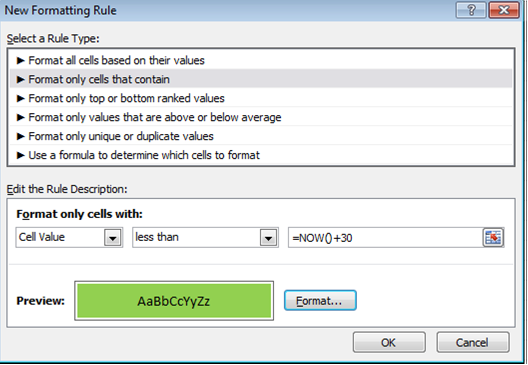
From Excel 2010, there’s a way to automatically highlight upcoming and past due dates. For example, if you have expiry dates for stock in a spreadsheet, it’s possible to highlight the stock that has expired as well as the stock that will expire within 30 days. This is achievable with conditional formatting. Below is a […]
Business Intelligence for SMB’s Part 3: 5 benefits of Business Intelligence for SMBs
Business Intelligence (BI) has become quite the ‘buzzword’ in the software industry in the last few years, yet many small business owners still view it as the realm of big business only. As we move towards 2020 and information overload becomes commonplace, however, SMBs are now starting to realize that BI can benefit them too. […]
Business Intelligence for SMB’s Part 1: Business Intelligence in the Future
In December I was very privileged to take a break with my family and enjoy a week’s holiday in the beautiful snowy mountains of British Columbia, Canada. At the same time a colleague and good friend of mine was driving with his family through a beautiful part of South Africa known as the Karoo, heading […]
A new year’s resolution for SMBs
As small to mid-sized businesses enter 2012, many owners and executives may be considering technology-related strategies to streamline processes, gain competitive advantage and generally make their lives easier in the year ahead. Erik Kaas, Vice President of Product Management for Mid-market ERP products, Sage North America, discusses here why it’s time for companies to get […]
How to Create One Report from Two Independent Systems
I have just come across a post on the Plus Computer blog that discusses the best way of getting data from Sage ERP Accpac and Sage CRM, two independent but synchronized systems, into one report. Read it and see why the author, Alistair Hill, reaches the conclusion that solutions like Sage ERP Accpac Intelligence are designed exactly […]
Softline bolsters business intelligence offering with Alchemex acquisition
Have a look at the Softline blog for views on the synergies between Softline and Alchemex and why the Alchemex business intelligence solution is a natural extension of Softline’s business applications: http://blog.softline.co.za/2011/12/01/softline-bolsters-business-intelligence-offering-with-alchemex-acquisition/ Softline and Alchemex are part of the Sage Group plc.
Alchemex acquired by the Sage Group
The directors of Alchemex (Pty) Ltd are pleased and proud to advise that Alchemex was acquired by Softline, effective October 1, 2011. From this date, Alchemex became part of Softline and the Sage Group plc. Sage views this as a strategic acquisition to address the burgeoning need for Business Intelligence in the Small and Mid-Sized […]
Santa delivers ERP dashboard
Glen Mund recently requested an ERP Dashboard for Christmas. It was at the top of his wish list, ahead of the “Inception” DVD and a pair of “BOSE” noise reduction headphones. And it was on his list despite the fact that he actually has an ERP dashboard already. You see, his current ERP dashboard is calculated […]
Should BI belong on the IT side or the business side?
A recent simple question in a BI discussion group on Linkedin posed the question that always lingers regarding the nature of ownership of successful BI projects. Should BI reside on the IT side or the business side? This conversation could typically be broken into two camps, those that enjoy doing the BI plumbing, and those […]
 © Sage South Africa Pty Ltd 2020
.
All Rights Reserved.
© Sage South Africa Pty Ltd 2020
.
All Rights Reserved.