
Did you know that you can grant or restrict access to reports in the Sage Intelligence Report Viewer? Sage Intelligence makes this easy to do. Perhaps you’re busy developing a new report and you don’t want users to be able to run it from the Viewer until you’re happy with it. In this tip, I’m […]
- Solutions
All Solutions
- Standalone Reporting Tool
- Sage Intelligence for Accounting
- Sage 300cloud Intelligence
- Sage 50cloud Pastel Intelligence Reporting
- Sage Pastel Payroll Intelligence Reporting
- Sage 100/200 Evolution Intelligence Reporting
- Sage 100 Intelligence Reporting
- Sage 300 Intelligence Reporting
- Sage 500 Intelligence Reporting
- Sage VIP Intelligence Reporting
- Resources
All Solutions
- Standalone Reporting Tool
- Sage Intelligence for Accounting
- Sage 300cloud Intelligence
- Sage 50cloud Pastel Intelligence Reporting
- Sage Pastel Payroll Intelligence Reporting
- Sage 100/200 Evolution Intelligence Reporting
- Sage 100 Intelligence Reporting
- Sage 300 Intelligence Reporting
- Sage 500 Intelligence Reporting
- Sage VIP Intelligence Reporting
Additional Reports
Download our latest Report Utility tool, giving you the ability to access a library of continually updated reports. You don’t need to waste time manually importing new reports, they are automatically imported into the Report Manager module for you to start using.Sage Intelligence Tips & Tricks
Our Sage Intelligence Tips and Tricks will help you make the most of your favorite reporting solution.Excel Tips & Tricks
Our Excel Tips and Tricks will help you improve your business reporting knowledge and skills.- Learning
- Support
All Solutions
- Standalone Reporting Tool
- Sage Intelligence for Accounting
- Sage 300cloud Intelligence
- Sage 50cloud Pastel Intelligence Reporting
- Sage Pastel Payroll Intelligence Reporting
- Sage 100/200 Evolution Intelligence Reporting
- Sage 100 Intelligence Reporting
- Sage 300 Intelligence Reporting
- Sage 500 Intelligence Reporting
- Sage VIP Intelligence Reporting
Additional Reports
Download our latest Report Utility tool, giving you the ability to access a library of continually updated reports. You don’t need to waste time manually importing new reports, they are automatically imported into the Report Manager module for you to start using.Sage Intelligence Tips & Tricks
Our Sage Intelligence Tips and Tricks will help you make the most of your favorite reporting solution.Excel Tips & Tricks
Our Excel Tips and Tricks will help you improve your business reporting knowledge and skills.Get Support Assistance
Can’t find the solution to the challenge you’re facing in the resource library? No problem! Our highly-trained support team are here to help you out.Knowledgebase
Did you know that you also have access to the same knowledgebase articles our colleagues use here at Sage Intelligence? Available 24/7, the Sage Intelligence Knowledgebase gives you access to articles written and updated by Sage support analysts.Report Writers
Having some trouble creating or customizing the exact report you need to suit your business’s requirements? Contact one of the expert report writers recommended by Sage Intelligence.- Sage City
- University
- About Us
- Contact Us
Tips & Tricks
Conveniently remove blank item rows in your PivotTable reports
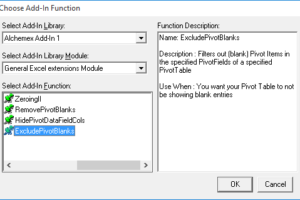
When creating reports, it’s usually preferred that rows with irrelevant data are excluded—as this results in a tidier, more readable report. When it comes to PivotTable reports, this can include rows with blank items. Below is an example of a report with them shown. To get rid of them, we have an add-in specifically for […]
Easily start up other apps when running Sage Intelligence reports
When working with reports, you may make use of other tools to help analyze the data in them. For example; a calculator or notepad. Did you know that Sage Intelligence allows you to automatically open other programs when a report is run? Through the CmdExec add-in this is possible. In this tip, I’m going to […]
Learn how to report on more than just your financials in the Financial Report Designer
The Sage Intelligence Financial Report Designer report provides a comprehensive tool for your financial reporting needs. However, there may be times when you’d like to include other data in it to add to the information you can report on in a single report. Although the Report Designer has a defined structure which must be maintained, […]
Beef up your Financial Health Check report with your own financial ratio
In our last tip, you were introduced to the new financial ratio reports provided through the Report Utility, which you can use to perform a health check of your business. If you didn’t catch it, or would like to brush up on it, you can find it here. Although the reports are comprehensive, they don’t […]
Performing a health check of your business using Financial Ratio reports
At Sage Intelligence, we believe in providing you with the right information to help you improve the running of your business, and give you back your time. One of the ways we do this is through the free Financial Ratio reports that you can access through our Report Utility. Over the past few weeks, we’ve […]
Adding a report template to a new report in Sage Intelligence Reporting
In our last tip, you discovered that with an existing report, you’re able to make and save changes to a layout as a result of the Excel template that is associated with it. This means that any modifications you make persist each time the report is run, with the latest data being populated. If you’d […]
Saving changes to an existing report layout in Sage Intelligence Reporting
Sage Intelligence Reporting allows you to create reports of your own, as well as customize your existing ones, all in the familiar environment of Microsoft® Excel®. This is based on the Excel template that gets attached to each report. Once it’s linked back, after any changes have been made, the formulas will update seamlessly with […]
Get your filters to stick in PivotTable reports
Have you ever tried to make use of filters in your PivotTable reports, only to find that they don’t stick when you save your template back to the report in the Report Manager? When your workbook is generated, maybe you’d prefer blank items to be hidden, or you would like it to default to the […]
Enable the recipients of your distributed reports to interact with PivotTables like you do
Have you ever distributed reports containing PivotTables and found that your recipients aren’t able to interact with them, only having a snapshot of the data? Wouldn’t it be great if they could have some of the same functionality you do, like the ability to filter, drill down, or add other fields that may be of […]
Return to topLearning
Sage South Africa
© Sage South Africa Pty Ltd 2020
.
All Rights Reserved.
