


Last week we showed you how you can keep your company in good standing by honouring your loan installments, and we showed you how to work out your loan installment using an interactive financial program. In relation, it’s important to know the periodic payment, principal amount and interest rate that you’ll be paying, which you […]
- Solutions
All Solutions
- Standalone Reporting Tool
- Sage Intelligence for Accounting
- Sage 300cloud Intelligence
- Sage 50cloud Pastel Intelligence Reporting
- Sage Pastel Payroll Intelligence Reporting
- Sage 100/200 Evolution Intelligence Reporting
- Sage 100 Intelligence Reporting
- Sage 300 Intelligence Reporting
- Sage 500 Intelligence Reporting
- Sage VIP Intelligence Reporting
- Resources
All Solutions
- Standalone Reporting Tool
- Sage Intelligence for Accounting
- Sage 300cloud Intelligence
- Sage 50cloud Pastel Intelligence Reporting
- Sage Pastel Payroll Intelligence Reporting
- Sage 100/200 Evolution Intelligence Reporting
- Sage 100 Intelligence Reporting
- Sage 300 Intelligence Reporting
- Sage 500 Intelligence Reporting
- Sage VIP Intelligence Reporting
Additional Reports
Download our latest Report Utility tool, giving you the ability to access a library of continually updated reports. You don’t need to waste time manually importing new reports, they are automatically imported into the Report Manager module for you to start using.Sage Intelligence Tips & Tricks
Our Sage Intelligence Tips and Tricks will help you make the most of your favorite reporting solution.Excel Tips & Tricks
Our Excel Tips and Tricks will help you improve your business reporting knowledge and skills.
How to calculate your loan installment using an interactive financial program
If your company has a loan, to keep it in good standing, you need to ensure that loan installments are honored. Knowing how much the installment is, and how often it has to be paid, will help you manage your finances better. Last year we shared a tip on how to use the PMT Function […]
How to create a drop down list using Dynamic Data Validation
A data validation list is an excellent feature that helps you quickly enter correct information into a data range. Let’s say you are entering departments, wouldn’t you rather select the names from a drop down list instead of typing? A dynamic data validation list is a better option. With a dynamic list as you edit/update […]
How to calculate your financial year-end date
We recently closed Fiscal Year 2014 and are now in Fiscal Year 2015, you can imagine how much work was on our finance team’s plate especially with the beloved auditors roaming in our offices! If you haven’t yet approached your financial year-end, this tip will help you ensure that you don’t miss it by helping […]
How to calculate the Maturity Date of an Investment
If you have an investment and would like to know the exact date that it will mature, use the EDATE function. Let’s say your investment will give a yield in 12 months, but you want to know the actual date, you can calculate it with the EDATE function which returns a serial number representing a […]
Easily recover an unsaved workbook in Microsoft Excel
If you’ve experienced the mishap of mistakenly closing a file while working on it, or losing it due to a power failure or gremlin in your computer, you’ll know how frustrating it can be. Fortunately, changes were made in Microsoft® Excel® 2010 and 2013 which make the process to recover an unsaved workbook much simpler. […]
Get a better idea of future cash flow by calculating depreciation
Calculating depreciation, which is a decrease in an assets value, for a given period is vital for any business. It helps give an accurate picture of total assets which allows a business to have a better idea of its future cash flow or revenue strength. Luckily you can easily calculate depreciation in Microsoft® Excel® using […]
Automatically highlight upcoming and past due dates
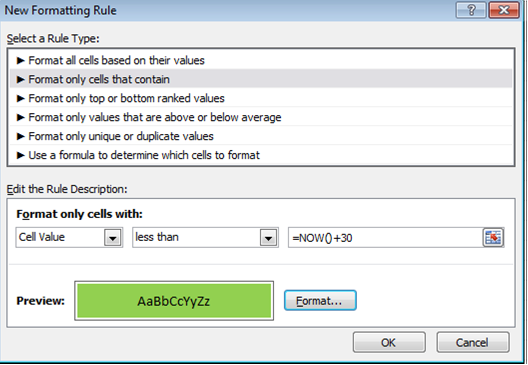
From Excel 2010, there’s a way to automatically highlight upcoming and past due dates. For example, if you have expiry dates for stock in a spreadsheet, it’s possible to highlight the stock that has expired as well as the stock that will expire within 30 days. This is achievable with conditional formatting. Below is a […]
 © Sage South Africa Pty Ltd 2020
.
All Rights Reserved.
© Sage South Africa Pty Ltd 2020
.
All Rights Reserved.